九韶内核 1.0.0.0
载入中...
搜索中...
未找到
拓扑结构的构建

MakeShape

快捷创建拓扑结构是一项基础需求,而 AMCAX::MakeVertex、AMCAX::MakeEdge、AMCAX::MakeWire、AMCAX::MakeFace 等提供了不同拓扑结构的快捷创建方式,这是极为常用且重要的功能。

MakeVertex

创建 Vertex 可通过一个 Point3 实现:

// Construct a vertex from a point
AMCAX::Point3 p1(1., 2., 3.);
创建顶点的类
定义 MakeVertex.hpp:18
顶点类
定义 TopoVertex.hpp:12
PointT< double, 3 > Point3
三维点
定义 PointT.hpp:459

MakeEdge

AMCAX::MakeEdge 可通过 Curve 快捷创建 Edge。若 MakeEdge 的输入中未包含 Vertex,它会自动生成两个 Vertex。这意味着,若想通过 MakeEdge 构建两条相连的 Edge,需特别注意 Vertex 的共用问题 —— 简单创建会得到 2 个 Edge 和 4 个 Vertex。此外,退化边也可通过 MakeEdge 构建。MakeEdge 功能丰富,下文将分类介绍:

简单构建

可通过两个 Point3 构建线段 Edge,也可通过两个 TopoVertex 构建。需要注意的是,两个 Point3/TopoVertex 之间的距离需大于 AMCAX::Precision::Confusion (),否则会被判定为同一个 Point3/TopoVertex。

// Construct an edge from two points
AMCAX::Point3 p1(0., 0., 0.);
AMCAX::Point3 p2(1.0, 0.0, 0.0);
// Construct from two vertices
创建边的类
定义 MakeEdge.hpp:26
边的类
定义 TopoEdge.hpp:12

基于数学表达构建

例如,可基于 Circle3、Line3 等数学表达式构建,以下以 Line3 为例:

// Construct from an infinite line
AMCAX::Point3 p(0., 0., 0.);
AMCAX::Direction3 dir(1.0, 0.0, 0.0);
AMCAX::Line3 line(p, dir);
// Construct from a line with parameter bounds
double fp = 0.0;
double lp = 1.0;
AMCAX::TopoEdge edge2 = AMCAX::MakeEdge(line, fp, lp);
// Construct from a line with two end points
AMCAX::Point3 p1(0., 0., 0.);// The first point
AMCAX::Point3 p2(1.0, 0.0, 0.0);// The second point
AMCAX::TopoEdge edge3 = AMCAX::MakeEdge(line, p1, p2);
// Construct from a line with two end vertices
AMCAX::TopoVertex v1 = AMCAX::MakeVertex(p1);// The first vertex
AMCAX::TopoVertex v2 = AMCAX::MakeVertex(p2);// The second vertex
AMCAX::TopoEdge edge4 = AMCAX::MakeEdge(line, v1, v2);
LineS< 3 > Line3
三维直线
定义 LineT.hpp:457
DirectionT< double, 3 > Direction3
三维方向
定义 DirectionT.hpp:566

此外,MakeEdge 会根据数学表达自动调整参数、Point3、Vertex 的顺序,以及 Vertex 的 Orientation:

AMCAX::TopoEdge edge5 = AMCAX::MakeEdge(line, lp, fp); // same as MakeEdge(line, fp, lp)
AMCAX::TopoEdge edge6 = AMCAX::MakeEdge(line, p2, p1); // same as MakeEdge(line, p1, p2)
AMCAX::TopoEdge edge7 = AMCAX::MakeEdge(line, v2, v1); // same as MakeEdge(line, v1, v2)

基于 curve 3d 构建

这是基于 curve 构建 Edge 的重要功能。在此,MakeEdge 仍会自动调整参数、Point3、Vertex 的顺序,以及 Vertex 的 Orientation。具体构建方法如下:

// Construct from a curve
AMCAX::Point3 p(0., 0., 0.);
AMCAX::Direction3 dir(1.0, 0.0, 0.0);
AMCAX::Line3 line(p, dir);
std::shared_ptr<AMCAX::Geom3Curve> curve = std::make_shared<AMCAX::Geom3Line>(line);
// Construct from a curve with parameter bounds
double fp = 0.0;
double lp = 1.0;
AMCAX::TopoEdge edge2 = AMCAX::MakeEdge(curve, fp, lp);
// Construct from a curve with two end points
AMCAX::Point3 p1(0., 0., 0.);// The first point
AMCAX::Point3 p2(1.0, 0.0, 0.0);// The second point
AMCAX::TopoEdge edge3 = AMCAX::MakeEdge(curve, p1, p2);
// Construct from a curve with two end points and their parameters
AMCAX::TopoEdge edge4 = AMCAX::MakeEdge(curve, p1, p2, fp, lp);
// Construct from a curve with two end vertices
AMCAX::TopoVertex v1 = AMCAX::MakeVertex(p1);// The first vertex
AMCAX::TopoVertex v2 = AMCAX::MakeVertex(p2);// The second vertex
AMCAX::TopoEdge edge5 = AMCAX::MakeEdge(curve, v1, v2);
// Construct from a curve with two end vertices and their parameters
AMCAX::TopoEdge edge6 = AMCAX::MakeEdge(curve, v1, v2, fp, lp);

基于 pcurve 构建

需要注意的是,基于 pcurve 与 Surface 构建的 Edge 不包含 curve3d。在此,MakeEdge 仍会自动调整参数、Point3、Vertex 的顺序,以及 Vertex 的 Orientation。具体构建方法如下:

// Construct from a pcurve on a surface
AMCAX::Point2 point(0., 0.);
AMCAX::Direction2 dir(1., 0.);
std::shared_ptr<AMCAX::Geom2Curve> pcurve = std::make_shared<AMCAX::Geom2Line>(point, dir);
std::shared_ptr<AMCAX::Geom3Surface> surf = std::make_shared<AMCAX::Geom3Plane>(frame); // xoy
AMCAX::TopoEdge edge1 = AMCAX::MakeEdge(pcurve, surf);
// Construct from a pcurve on a surface with parameter bounds
double fp = 0.0;
double lp = 1.0;
AMCAX::TopoEdge edge2 = AMCAX::MakeEdge(pcurve, surf, fp, lp);
// Construct from a pcurve on a surface with two end points
AMCAX::Point3 p1(0., 0., 0.);// The first point
AMCAX::Point3 p2(1.0, 0.0, 0.0);// The second point
AMCAX::TopoEdge edge3 = AMCAX::MakeEdge(pcurve, surf, p1, p2);
// Construct from a pcurve on a surface with two end points and their parameters
AMCAX::TopoEdge edge4 = AMCAX::MakeEdge(pcurve, surf, p1, p2, fp, lp);
// Construct from a pcurve on a surface with two end vertices
AMCAX::TopoVertex v1 = AMCAX::MakeVertex(p1);// The first vertex
AMCAX::TopoVertex v2 = AMCAX::MakeVertex(p2);// The second vertex
AMCAX::TopoEdge edge5 = AMCAX::MakeEdge(pcurve, surf, v1, v2);
// Construct from a pcurve on a surface with two end vertices and their parameters
AMCAX::TopoEdge edge6 = AMCAX::MakeEdge(pcurve, surf, v1, v2, fp, lp);
DirectionT< double, 2 > Direction2
二维方向
定义 DirectionT.hpp:563
FrameT< double, 3 > Frame3
三维标架
定义 FrameT.hpp:887
PointT< double, 2 > Point2
二维点
定义 PointT.hpp:456

MakeWire

构建一个 Wire 可以通过以下三种方式:

单独添加 Edge

// Make edge
AMCAX::Point3 p1(-4.0, -1.0, 0.0);
AMCAX::Point3 p2(4.0, -1.0, 0.0);
AMCAX::Point3 p3(4.0, 1.0, 0.0);
AMCAX::Point3 p4(-4.0, 1.0, 0.0);
// Add an edge to the wire
AMCAX::MakeWire makewire1;
makewire1.Add(e1);
makewire1.Add(e2);
makewire1.Add(e3);
makewire1.Add(e4);
// Get the wire
AMCAX::TopoWire wire = makewire1.Wire();
// Error
AMCAX::MakeWire makewire2;
makewire2.Add(e1);
makewire2.Add(e3);
std::cout << makewire2.IsDone() << std::endl;// 0
std::cout << "error type:" << int(makewire2.Error());// 2
创建环的类
定义 MakeWire.hpp:19
AMCAX_API const TopoWire & Wire()
获取构造的环
AMCAX_API WireError Error() const noexcept
获取构造过程中的错误状态
AMCAX_API void Add(const TopoEdge &e)
向环中添加边
AMCAX_API bool IsDone() const noexcept override
判断构造算法是否完成
环类
定义 TopoWire.hpp:12

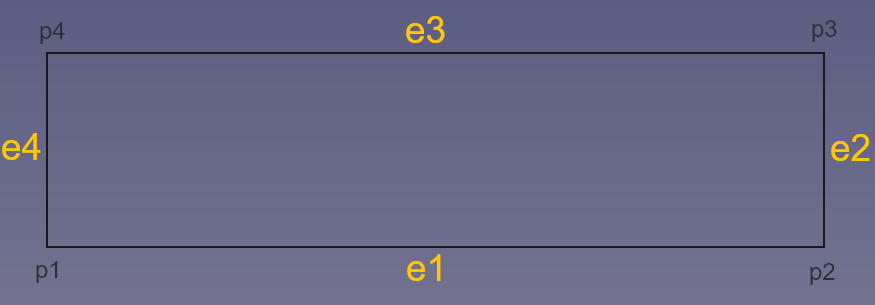
注:每次添加的边必须与已添加的边在几何上相连。在上述示例中,若按 e1—e3—e2—e4 的顺序添加,在添加 e3 时会因与 e1 不相连而失败,此时调用 IsDone () 将返回 false,调用 Error () 将返回 WireError::DisconnectedWire。若能确定待连成 wire 的 edge 彼此相连但不清楚具体连接关系,则必须采用下文一次性添加 edge 列表的方式。

添加 Edge 的 list

列表中 edge 的顺序不影响构造结果。

// Make edge
AMCAX::Point3 p1(-4.0, -1.0, 0.0);
AMCAX::Point3 p2(4.0, -1.0, 0.0);
AMCAX::Point3 p3(4.0, 1.0, 0.0);
AMCAX::Point3 p4(-4.0, 1.0, 0.0);
// Add a list of edges to the wire
std::list<AMCAX::TopoShape> elist = { e1, e3, e2, e4 };
AMCAX::MakeWire makewire;
makewire.Add(elist);
// Get the wire
AMCAX::TopoWire wire = makewire.Wire();

添加 wire

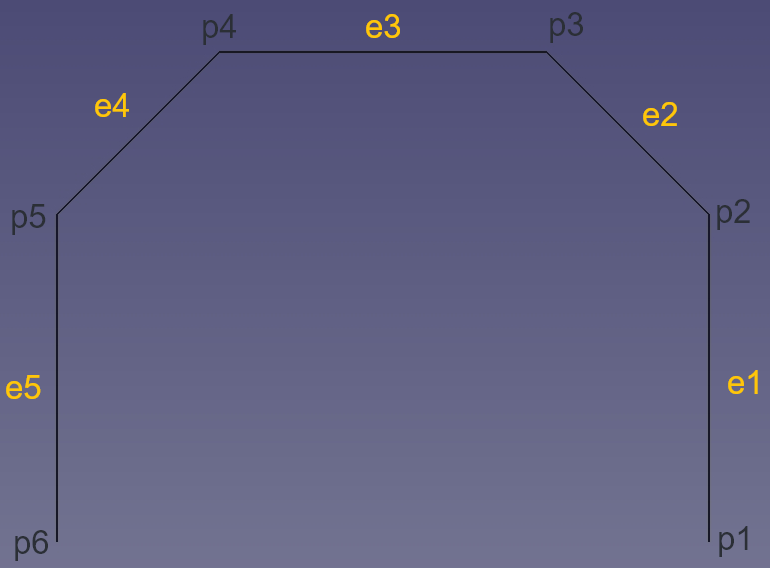
在添加 wire 时,要求待添加 wire 的第一条 edge 需与已有的 wire 相连,Add 操作才能成功。

// Make edge
AMCAX::Point3 p1(10., 0., 0.);
AMCAX::Point3 p2(15., 5., 0.);
AMCAX::Point3 p3(15., 10., 0.);
AMCAX::Point3 p4(10., 15., 0.);
AMCAX::Point3 p5(5., 15., 0.);
AMCAX::Point3 p6(0., 10., 0.);
// Make wire123
AMCAX::MakeWire mw1(e1, e2, e3);
AMCAX::TopoWire wire123 = mw1.Wire();
// Make wire45
AMCAX::MakeWire mw2(e4, e5);
AMCAX::TopoWire wire45 = mw2.Wire();
// Add wire45 to wire123
AMCAX::MakeWire mw3(wire123);
mw3.Add(wire45);
AMCAX::TopoWire wire12345 = mw3.Wire();
// Error
// Make wire54
AMCAX::MakeWire mw4(e5, e4);
AMCAX::TopoWire wire54 = mw4.Wire();
// Add wire45 to wire123
AMCAX::MakeWire mw5(wire123);
mw5.Add(wire54);
std::cout << mw5.IsDone() << std::endl;// 0
std::cout << "error type:" << int(mw5.Error());// 2

在该示例中,若向现有 wire123 中添加 wire54,由于 wire54 中的第一条 edge (edge5)与 wire123 不相连,所以此时调用 IsDone () 将返回 false,调用 Error () 将返回 WireError::DisconnectedWire。

MakeFace

MakeFace 功能丰富,下文将分类介绍:

基于数学表达

可基于 Plane、Cylinder 等数学表达式构建,以下以 Plane 为例:

// Construct from a plane with parameter bounds
AMCAX::Plane plane(frame); // xoy
double uMin = 0.0;
double uMax = 1.0;
double vMin = 0.0;
double vMax = 1.0;
AMCAX::TopoFace face = AMCAX::MakeFace(plane, uMin, uMax, vMin, vMax);
创建面的类
定义 MakeFace.hpp:24
平面类
定义 Plane.hpp:13
面类
定义 TopoFace.hpp:12

基于 Surface

基于 Geom3Surface 构建 Face 是 MakeFace 最常用的功能。

// Construct from a surface with parameter bounds and tolerance
std::shared_ptr<AMCAX::Geom3Surface> surface = std::make_shared<AMCAX::Geom3Plane>(frame);
double uMin = 0.0;
double uMax = 1.0;
double vMin = 0.0;
double vMax = 1.0;
AMCAX::TopoFace face = AMCAX::MakeFace(surface, uMin, uMax, vMin, vMax, tol);
static constexpr double Confusion() noexcept
获取混淆容差
定义 Precision.hpp:122

MakeFace 要求在提供 Surface 的同时提供 Tolerance。需要注意的是,当输入的曲面为无穷大且没有约束参数范围时,将不会自动生成 Wire。其余情况都会自动生成 Wire。

基于 Wire

单独 Wire

当 Wire 为平面上的 Wire 时,输入单独 Wire 即可成功构建 Face。

// Construct a wire
double r = 1.0;// radius
AMCAX::Circle3 circle(frame, r);
AMCAX::TopoEdge circleEdge = AMCAX::MakeEdge(circle);
AMCAX::TopoWire wire = AMCAX::MakeWire(circleEdge);
CircleS< 3 > Circle3
三维圆
定义 CircleT.hpp:187

注:单独输入不在平面上的 Wire 可能会构建 Face 失败。

Wire + 数学表达

// Construct a wire
double r = 1.0;// radius
AMCAX::Circle3 circle(frame, r);
AMCAX::TopoEdge circleEdge = AMCAX::MakeEdge(circle);
AMCAX::TopoWire wire = AMCAX::MakeWire(circleEdge);
AMCAX::Plane plane(frame);// xoy
bool inside = true;
AMCAX::TopoFace face = AMCAX::MakeFace(plane, wire, inside);

注:需指定 Face 所表示的区域位于 Wire 的内部还是外部(最后的 bool 参数中,true 表示位于内部)。

Wire + Surface

// Construct a wire
double r = 1.0;// radius
AMCAX::Circle3 circle(frame, r);
AMCAX::TopoEdge circleEdge = AMCAX::MakeEdge(circle);
AMCAX::TopoWire wire = AMCAX::MakeWire(circleEdge);
std::shared_ptr<AMCAX::Geom3Surface> surface = std::make_shared<AMCAX::Geom3Plane>(frame);
bool inside = true;
AMCAX::TopoFace face = AMCAX::MakeFace(surface, wire, inside);

Wire + Face

// Construct a wire
double r1 = 1.0;// radius
AMCAX::Circle3 circle1(frame1, r1);
AMCAX::TopoEdge circleEdge1 = AMCAX::MakeEdge(circle1);
AMCAX::TopoWire wire1 = AMCAX::MakeWire(circleEdge1);
// Construct face1 from surface1 and wire1
std::shared_ptr<AMCAX::Geom3Surface> surface1 = std::make_shared<AMCAX::Geom3Plane>(frame1);
bool inside = true;
AMCAX::TopoFace face1 = AMCAX::MakeFace(surface1, wire1, inside);
// Construct face2 from face1 and wire2 (the wire2 will be added to the face1)
AMCAX::Point3 point(0., 0., 0.);
AMCAX::Direction3 dir(0., 0., -1.);
AMCAX::Frame3 frame2(point, dir);
double r2 = 0.5;// radius
AMCAX::Circle3 circle2(frame2, r2);
AMCAX::TopoEdge circleEdge2 = AMCAX::MakeEdge(circle2);
AMCAX::TopoWire wire2 = AMCAX::MakeWire(circleEdge2);
AMCAX::TopoFace face2 = AMCAX::MakeFace(face1, wire2);

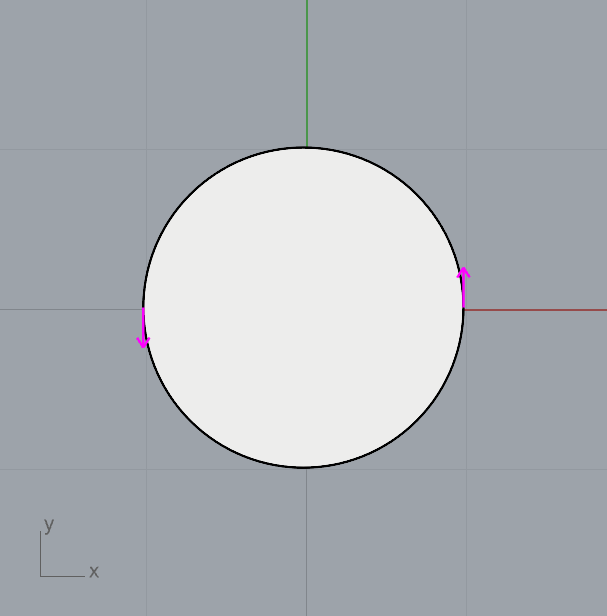
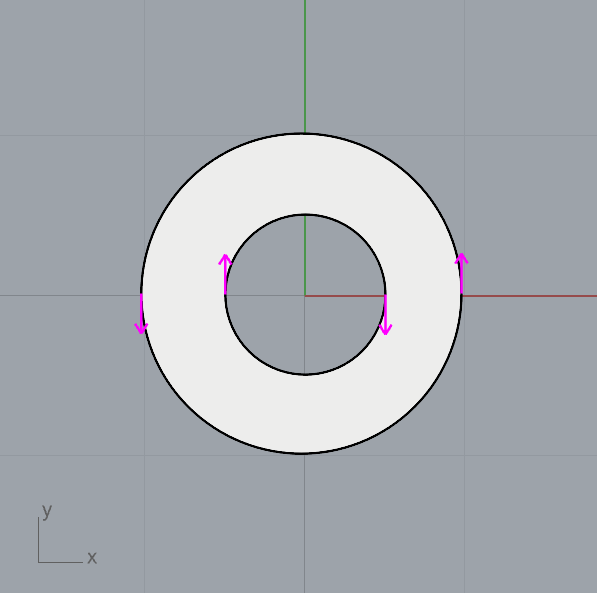
结果如下图所示:左边为 face1,右图为 face2。

但需注意 Wire 的 Orientation,即若按如下写法,会得到错误结果。

// Construct a wire
double r1 = 1.0;// radius
AMCAX::Circle3 circle1(frame1, r1);
AMCAX::TopoEdge circleEdge1 = AMCAX::MakeEdge(circle1);
AMCAX::TopoWire wire1 = AMCAX::MakeWire(circleEdge1);
// Construct face1 from surface1 and wire1
std::shared_ptr<AMCAX::Geom3Surface> surface1 = std::make_shared<AMCAX::Geom3Plane>(frame1);
bool inside = true;
AMCAX::TopoFace face1 = AMCAX::MakeFace(surface1, wire1, inside);
// Construct face2 from face1 and wire2 (the wire2 will be added to the face1)
double r2 = 0.5;// radius
AMCAX::Circle3 circle2(frame1, r2);
AMCAX::TopoEdge circleEdge2 = AMCAX::MakeEdge(circle2);
AMCAX::TopoWire wire2 = AMCAX::MakeWire(circleEdge2);
AMCAX::TopoFace face2 = AMCAX::MakeFace(face1, wire2);

而修正方法是在 Edge 或 Wire 层级将其 Orientation 设为 Reversed,以下以 Wire 为例:

AMCAX::TopoShape reshape = wire2.Oriented(AMCAX::OrientationType::Reversed);
AMCAX::TopoFace face2_new = AMCAX::MakeFace(face1, wire2_new);
static AMCAX_API const TopoWire & Wire(const TopoShape &s)
将形状转换为环
形状的基类,包含具有位置和方向信息的基础形状
定义 TopoShape.hpp:15
AMCAX_API TopoShape Oriented(OrientationType orient) const noexcept
获取指定方向后的形状

TopoBuilder

尽管 Make*.hpp 提供了若干便于构建 TopoShape 的 API,但部分建模问题仍需依赖 TopoBuilder 解决。下文将介绍使用 TopoBuilder 构建不同拓扑结构的方法。

Vertex

MakeVertex 提供构建顶点的功能。

AMCAX::Point3 p(0.,0.,0.);
// Method 1
builder.MakeVertex(v, p, tol);// Make a vertex with a point
// Method 2
builder.MakeVertex(v);
builder.UpdateVertex(v, p, tol);// Update the point of a vertex
构造 B-Rep 结构的工具类
定义 TopoBuilder.hpp:39
AMCAX_API void MakeVertex(TopoVertex &v) const
构造空顶点
AMCAX_API void UpdateVertex(const TopoVertex &v, const Point3 &p, double tol) const
更新顶点的点

Edge

针对不同类型的 Edge,其构建方法各不相同,以下将逐一介绍:

普通 Edge

规范的建模思路为:先通过几何计算获取所有所需的 Point、Curve3d 及 Pcurve,再据此构建拓扑结构。

第一步:准备所需的 Curve3d ,基于该 Curve3d 构建 Edge 。

// Make a 3D curve
AMCAX::Point3 p(0.0, 0.0, 0.0);
AMCAX::Direction3 dir(1.0, 0.0, 0.0);
AMCAX::MakeGeom3Line line(p, dir);
std::shared_ptr<AMCAX::Geom3Curve >curve = line.Value();
// Make an edge with a curve
builder.MakeEdge(edge, curve, tol);
// Set the range of parameter of an edge
double fp = 0.0;
double lp = 2.0;
builder.Range(edge, fp, lp);
构造三维几何直线的类
定义 MakeGeom3Line.hpp:15
AMCAX_API void MakeEdge(TopoEdge &e) const
构造空边
AMCAX_API void Range(const TopoEdge &e, double first, double last, bool only3d=false) const
设置边的参数边界

Range 用于设置 TopoEdge 的参数范围。若 Curve3d 的参数范围与 TopoEdge 所需的参数范围一致,此步骤可省略。

第二步:准备 Edge 对应的起始 Vertex 与终止 Vertex,并将这两个 Vertex 关联至该 Edge。

// Make vertex
AMCAX::Point3 start(0.0, 0.0, 0.0);
AMCAX::Point3 last(2.0, 0.0, 0.0);
builder.MakeVertex(v1, start, tol);
builder.MakeVertex(v2, last, tol);
builder.Add(edge, v1);
// Method 1
v2.SetOrientation(AMCAX::OrientationType::Reversed);// Set the orientation of the vertex to Reversed
builder.Add(edge, v2);
// Method 2
v2.Reverse();
builder.Add(edge, v2);
// Method 3
builder.Add(edge, v2.Oriented(AMCAX::OrientationType::Reversed));
AMCAX_API void Add(TopoShape &s, const TopoShape &c) const
向形状中添加子形状
AMCAX_API void SetOrientation(OrientationType orient) noexcept
设置形状的方向
AMCAX_API void Reverse() noexcept
反转形状的方向

注:此处需注意起始 Vertex 与终止 Vertex 的 Orientation。TopoEdge 的起始 Vertex 方向为 Forward,终止 Vertex 方向为 Reversed。

由于 Orientation 的默认值为 Forward,因此需调整终止 Vertex 的方向属性。调整方式分为两类:一是对自身进行改变,对应的接口为 SetOrientation 和 Reverse;二是不对自身进行改变,生成一个方向为 Reversed 的新 Vertex,对应的接口为 Oriented,生成的新对象需传入 builder 中使用。

第三步:在完成 Face 的构建后,为其添加 Pcurve。

// Construct a face from a surface with parameter bounds
AMCAX::Point3 p1(0., 0., 0.);
AMCAX::Point3 p2(0., 2., 0.);
AMCAX::Point3 p3(0., 2., 2.);
AMCAX::Point3 p4(2., 0., 0.);
AMCAX::Point3 p5(2., 2., 0.);
AMCAX::MakeGeom3Plane mp1(p1, p2, p3);
AMCAX::MakeGeom3Plane mp2(p1, p4, p5);
double uMin = 0.0;
double uMax = 2.0;
double vMin = 0.0;
double vMax = 2.0;
std::shared_ptr< Geom3Surface > surf1 = mp1.Value();
std::shared_ptr< Geom3Surface > surf2 = mp2.Value();
AMCAX::TopoFace face1 = AMCAX::MakeFace(surf1, uMin, uMax, vMin, vMax, tol);
AMCAX::TopoFace face2 = AMCAX::MakeFace(surf2, uMin, uMax, vMin, vMax, tol);
// Update the pcurve of an edge on a face
std::shared_ptr< AMCAX::Geom2Curve > pcurve1;
std::shared_ptr< AMCAX::Geom2Curve > pcurve2;
builder.UpdateEdge(edge, pcurve1, face1, AMCAX::Precision::PConfusion());
builder.UpdateEdge(edge, pcurve2, face2, AMCAX::Precision::PConfusion());
构造三维几何平面的类
定义 MakeGeom3Plane.hpp:13
static constexpr double PConfusion(double t) noexcept
获取二维参数空间中的混淆容差
定义 Precision.hpp:127
AMCAX_API void UpdateEdge(const TopoEdge &e, const std::shared_ptr< Geom3Curve > &c, double tol) const
更新边的三维曲线和容差

需注意 Pcurve 的方向应与 Curve3d 保持一致,且 Edge 的 Orientation 对 Pcurve 的方向无任何影响,需牢记 “几何是几何,拓扑是拓扑” 的核心逻辑。

此外,添加 Vertex 的操作仅需在 MakeEdge 之后执行即可:一方面,第二步(添加 Vertex)与第三步(添加 Pcurve)的顺序可互换;另一方面,在设置 Range 之前添加 Vertex,同样不影响建模流程。

Seam Edge

其他的步骤都相同,仅第三步有所不同:

builder.UpdateEdge(edge, pcurve1, pcurve2, face, Precision::PConfusion());

需注意 pcurve1 与 pcurve2 的方向仍需与 curve3d 保持一致。二者的区别在于:pcurve1 对应正向(Forward)Edge 在 Surface 参数域上的参数曲线,pcurve2 对应反向(Reversed)Edge 在 Surface 参数域上的参数曲线。

Degenerated Edge

其他的步骤都相同,仅第一步不同,没有 curve3d:

builder.MakeEdge(edge);
builder.Degenerated(edge, true);
builder.Range(edge, 0.0, 2.0 * AMCAX::Constants::pi);
AMCAX_API void Degenerated(const TopoEdge &e, bool d) const
设置边的退化标志
constexpr double pi
数学常数 Pi,圆的周长与直径之比
定义 Constants.hpp:42

此处需注意将退化标志(Flag)设为 True。不同于常规情况,此处 Pcurve 的方向无需与 Curve3d 保持一致,只需与 Edge 的 Orientation 保持一致即可。

自由 Edge

其他的步骤都相同,仅第三步不同,只有 1 条 pcurve。

Wire

正常的思路是:
第一步:先依据参数域上的 Wire 确定其方向,再明确需选用的 Edge 以及这些 Edge 各自的 Orientation。

std::vector<std::pair<int, bool>> wireEdges1 =
{
{1, true},
{2, true},
{3, true},
{4, true}
};

第二步:构建 Edge 并将其添加至 Wire 中。

builder.MakeWire(wire1);
for (const auto& edgeInfo : wireEdges1)
{
int edgeID = edgeInfo.first;
bool isForward = edgeInfo.second;
AMCAX::TopoShape crshape = allEdges[edgeID - 1];
if (isForward)
{
edge = AMCAX::TopoCast::Edge(crshape.Oriented(AMCAX::OrientationType::Forward));
}
else
{
edge = AMCAX::TopoCast::Edge(crshape.Oriented(AMCAX::OrientationType::Reversed));
}
builder.Add(wire1, edge);
}
AMCAX_API void MakeWire(TopoWire &w) const
构造一个空环
static AMCAX_API const TopoEdge & Edge(const TopoShape &s)
将形状转换为边

注:这里 Edge 的添加顺序可以是任意的。
第三步:将 Wire 的 Closed Flag 设置为对应状态。

bool isClosedWire1 = AMCAX::TopoTool::IsClosed(wire1);
wire1.Closed(isClosedWire1);
AMCAX_API bool Closed() const noexcept
判断形状是否封闭
static AMCAX_API bool IsClosed(const TopoShape &s)
判断形状是否封闭

Face

构建 Face 的方法如下:

AMCAX::MakeGeom3Plane plane1(p1, -DZ);
builder.MakeFace(face1, plane1.Value(), AMCAX::Precision::Confusion());
builder.Add(face1, wire1);
static AMCAX_API const Direction3 & DZ() noexcept
获取三维中的 z 方向
AMCAX_API void MakeFace(TopoFace &f) const
构造一个空面

Shell

构建 Shell 时需要注意 Closed Flag,方法如下:

builder.MakeShell(shell);
std::vector<AMCAX::TopoFace> allFaces = { face1 };
for (const auto& face : allFaces)
{
builder.Add(shell, face);
}
bool isClosedShell = AMCAX::TopoTool::IsClosed(shell);
shell.Closed(isClosedShell);
AMCAX_API void MakeShell(TopoShell &s) const
构造一个空壳
壳体类
定义 TopoShell.hpp:12

Solid

构建 Solid 的方式如下:

builder.MakeSolid(solid);
builder.Add(solid, shell);
AMCAX_API void MakeSolid(TopoSolid &s) const
构造一个空实体
实体类
定义 TopoSolid.hpp:12

Compound

构建 Compound 的方式如下:

builder.MakeCompound(comp);
builder.Add(comp, anyShape);
AMCAX_API void MakeCompound(TopoCompound &c) const
构造一个空复合体
复合体的类
定义 TopoCompound.hpp:12