
AMCAX Kernel
Geometry kernel for CAD/CAE/CAM

AMCAX Kernel 1.0.0.0
BRep Structural Foundation

BRep Structure

Boundary Representation (BRep) is currently the most popular data structure. BRep can maintain completeness and unambiguity while reducing storage requirements. BRep uses points, curves, and surfaces on the boundaries of entities to represent those entities, and the volume information of the entity is derived from the three-dimensional space enclosed within the boundary. Its two basic elements are: geometric information (Point, Curve, Surface); and topological information (Vertex, Edge, Face connectivity).

Topological Structure

Definition

Let’s first define the various levels of topological structures in a BRep:
  • Vertex is a point in topological terms, corresponding to a geometric Point.
  • Edge is a line in topological terms, corresponding to a geometric Curve, and the two vertices that constrain the Curve’s boundaries.
  • Wire is a set of edges that are connected end to end, with adjacent edges sharing vertices.
  • Face is a surface in topological terms, corresponding to a geometric Surface, and constrained by several closed wires.
  • Shell is a set of connected Faces, where adjacent Faces share one or more edges.
  • Solid is a space enclosed by a closed Shell.
  • CompSolid is a set of Solids.
  • Compound is a collection of multiple topological structures.

Common Examples

Here are some examples to help you better understand the concept.
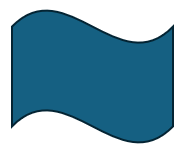
A Face formed by a Surface

It’s easy to see that this example consists of 4 Vertices, 4 Edges, 1 Wire, and 1 Face.
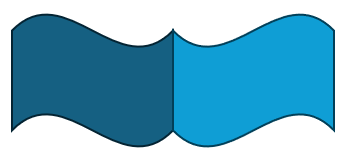
Shell formed by Two Adjacent Surfaces

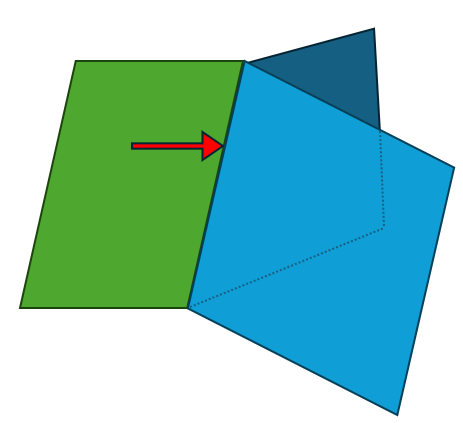
Since the overlapping vertices and edges in the middle are shared, this example consists of 6 Vertices, 7 Edges, 2 Wires, 2 Faces, and 1 Shell.
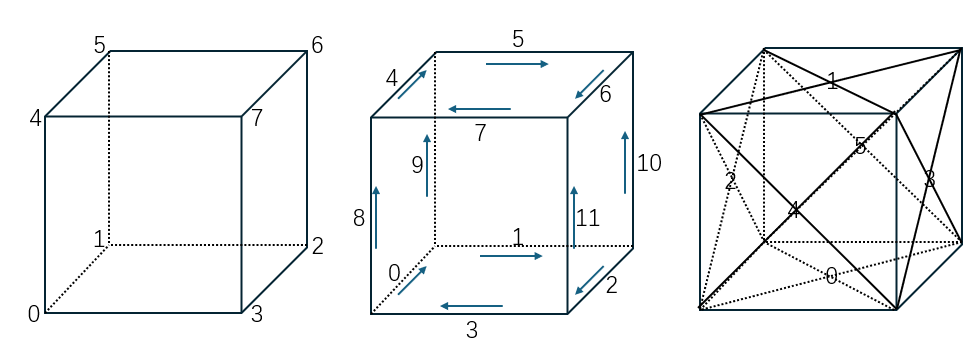
Cube

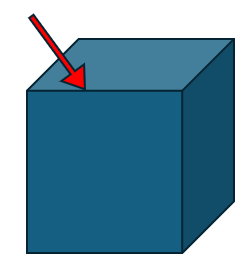
This example consists of 8 Vertices, 12 Edges, 6 Wires, 6 Faces, and 1 Shell.

Cylinder

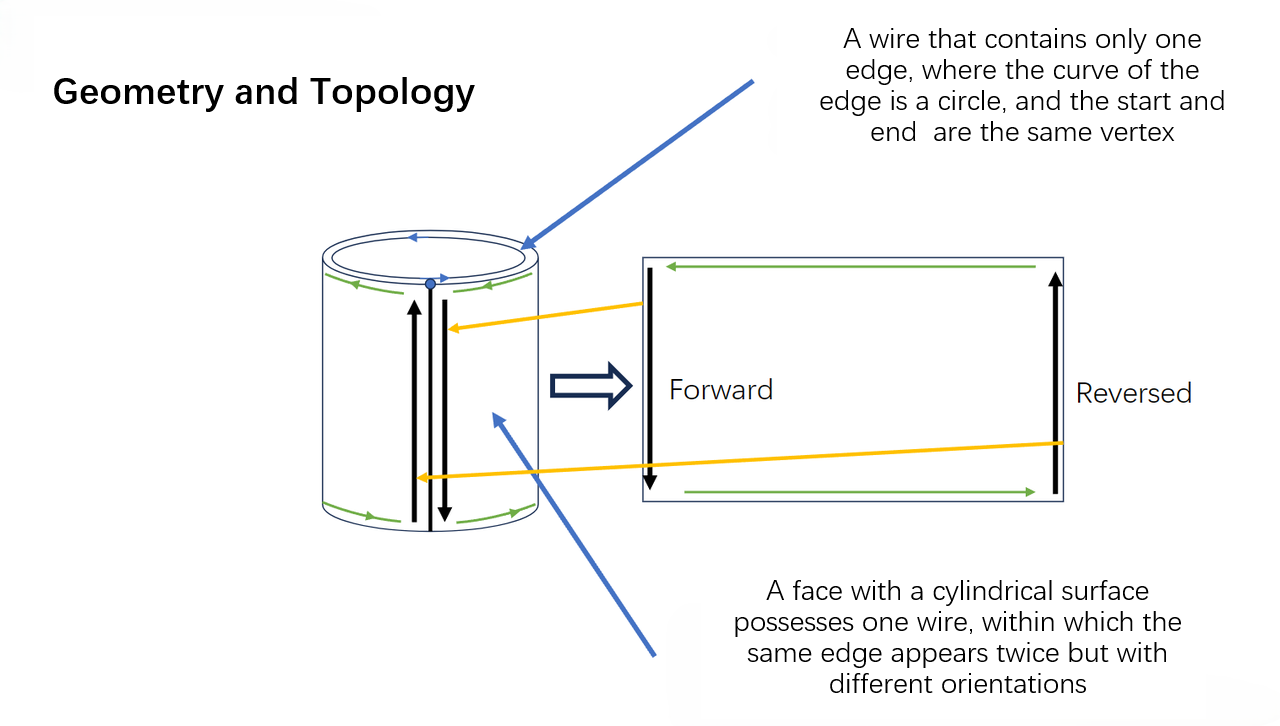
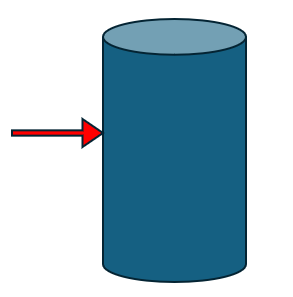
This example consists of 2 Vertices, 3 Edges, 3 Wires, 3 Faces, and 1 Shell. Edge 0 is reused in the Wire, making it a classic Seam Edge.
Sphere

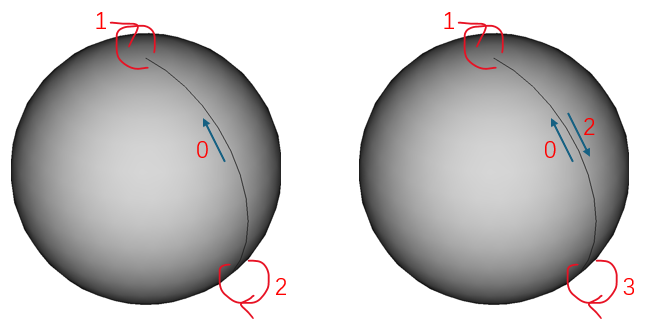
This example consists of 2 Vertices, 3 Edges, 1 Wire, 1 Face, and 1 Shell. In this case, there is not only a Seam Edge but also two Edges with no length. Despite having no length in 3D, these two Edges do have length in the parametric domain, making them classic Degenerated Edges.

Edge

Next, we will introduce some common types of Edges.

Ordinary Edge

In a closed TopoShape (like a Shell or Solid), the most common Edge is an edge that is adjacent to two different Faces. An ordinary Edge belongs to two different Faces and has a non-zero length.
Seam Edge

A common special case is the side edge of a cylinder. This Edge is owned by one Face and appears twice in the same Wire of that Face (once forward, once backward). Seam Edges are valid.
Degenerated Edge

A common special case is the top edge of a sphere. This Edge has zero length and degenerates into a point. Degenerated Edges are valid.

Free Edge

An Edge that belongs to only one Face and appears only once in that Face’s Wire is called a Free Edge. Free Edges are invalid in a closed TopoShape.

Non-Manifold Edge

An Edge that belongs to more than two Faces in one Shape or Solid is called a Non-Manifold Edge. Non-Manifold Edges are invalid.
Traversing Topological Structure

Tree Structure of TopoShape

Let’s first introduce the tree structure of a TopoShape, as shown below:
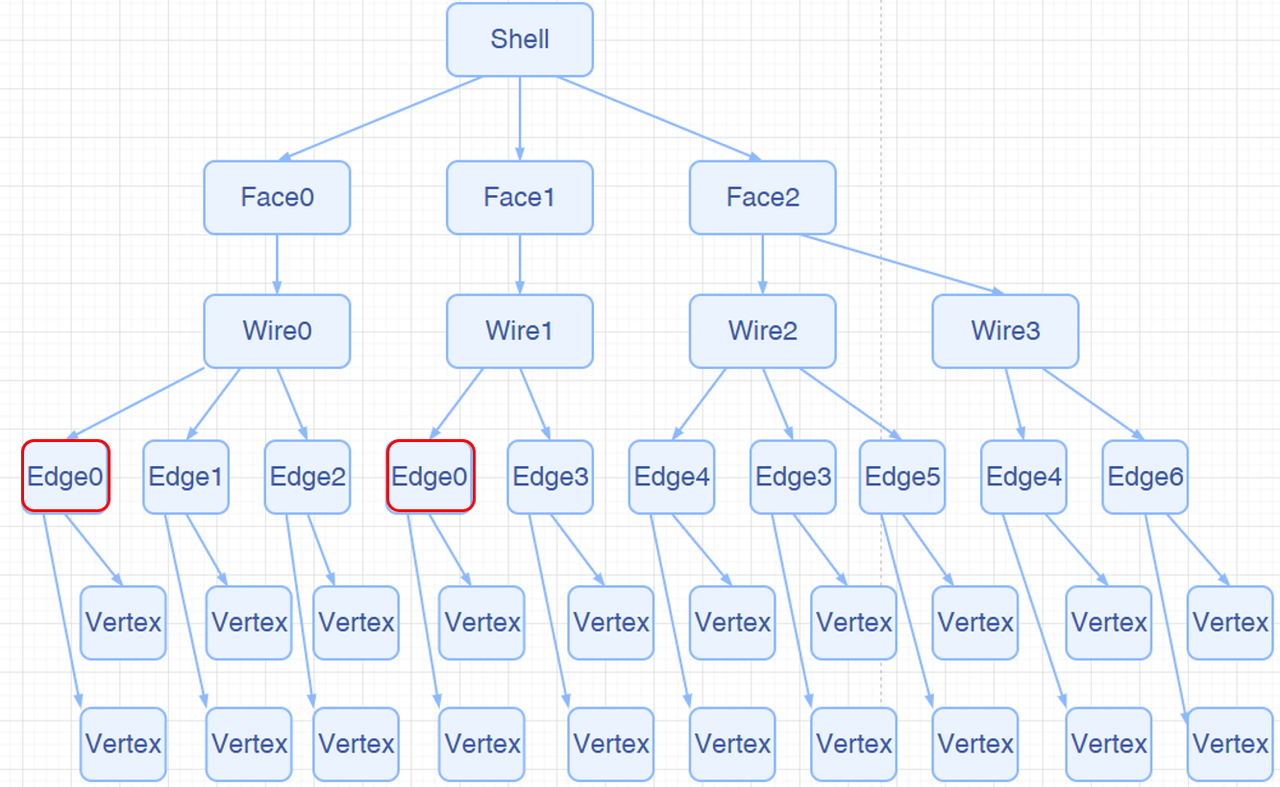
Traversing

Traversing a topological structure is a common operation. Our kernel provides two ways: AMCAX::TopoExplorer and AMCAX::WireExplorer. Let’s introduce both methods one by one.

TopoExplorer

AMCAX::TopoExplorer can traverse through specified types (Shape, Compound, CompSolid, Solid, Shell, Face, Wire, Edge, Vertex) within a TopoShape in a preorder manner, based on its tree structure, to find child shapes of the specified type. For example, to traverse the Faces of a TopoShape, you can use the following code:

for (AMCAX::TopoExplorer ex(shape, AMCAX::ShapeType::Face); ex.More(); ex.Next())
{
const AMCAX::TopoShape& crshape = ex.Current();
const AMCAX::TopoFace& crface = AMCAX::TopoCast::Face(crshape);
}
static AMCAX_API const TopoFace & Face(const TopoShape &s)
Cast shape to face.
Class of a tool for exploring the B-Rep structure.
Definition: TopoExplorer.hpp:14
AMCAX_API bool More() const
Does the explorer have more shapes.
Class of face.
Definition: TopoFace.hpp:12
Base class of shape, containing an underlying shape with a location and an orientation.
Definition: TopoShape.hpp:15

It’s important to note that AMCAX::TopoExplorer does not consider duplicates (level of "equality"). That is, if an Edge is shared by two Faces, AMCAX::TopoExplorer will traverse this Edge twice. If you don’t want to traverse it twice, you can use a std::unordered_set to remove duplicates, like this:

std::unordered_set<AMCAX::TopoShape> faceSet;
for (AMCAX::TopoExplorer ex(shape, AMCAX::ShapeType::Face); ex.More(); ex.Next())
{
const AMCAX::TopoShape& crshape = ex.Current();
if (faceSet.find(crshape) != faceSet.end())
{
continue;
}
const AMCAX::TopoFace& crface = AMCAX::TopoCast::Face(crshape);
}

In the above, we discussed duplication, which inherently implies the definition of "equality". Next, we will introduce the three levels of "equality" for TopoShape, with increasing strictness:
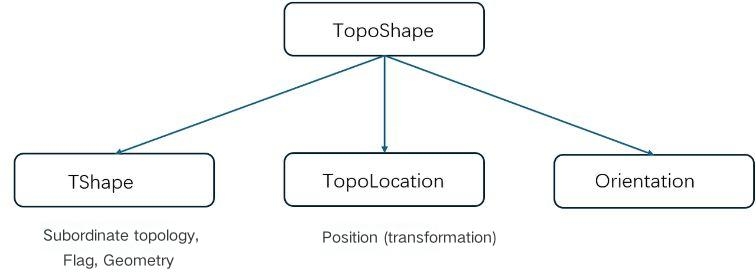
  • IsPartner:Consistent with TopoTshape
  • IsSame:Consistent with TopoTshape and TopoLocation
  • IsEqual:Consistent with TopoTshape , TopoLocation , and Orientation
  • IndexSet:Default is IsSame level

WireExplorer

It's not difficult to realize that when we need to traverse the edges of a Wire in order, AMCAX::TopoExplorer cannot actually meet the demand. However, AMCAX::WireExplorer can fulfill this requirement, though the traversal speed will decrease.

for (AMCAX::WireExplorer ex(wire); ex.More(); ex.Next())
{
const AMCAX::TopoEdge& edge = ex.Current();
}
Class of edge.
Definition: TopoEdge.hpp:12
Class of wire.
Definition: TopoWire.hpp:12
Class of tool for exploring wire.
Definition: WireExplorer.hpp:20
AMCAX_API bool More() const
Does the explorer have more edges.

Topological Information Retrieval

Index

Due to the tree structure and pre-order traversal, each Edge (similarly for Vertex, Wire, and Face) actually has its own index. The AMCAX::TopoExplorerTool class provides some convenient traversal operations. AMCAX::TopoExplorerTool::MapShapes can get an ordered set of indices for a specific type of topological structure (such as Edge), and the resulting set is unique.

AMCAX::TopoShape box = AMCAX::MakeBox(AMCAX::Point3(-5.0, -5.0, 0.0), AMCAX::Point3(5.0, 5.0, 3.0));
AMCAX::TopoExplorerTool::MapShapes(box, AMCAX::ShapeType::Edge, edgeIndexSet);
AMCAX::TopoEdge edge1 = static_cast<const AMCAX::TopoEdge&>(edgeIndexSet[3]);
//get id
int edgeid = edgeIndexSet.index(edge1);
std::cout << edgeid << std::endl;
int index(const key_type &key) const
Get the index of a given key.
Definition: IndexSet.hpp:195
Class of making a box.
Definition: MakeBox.hpp:18
static AMCAX_API void MapShapes(const TopoShape &s, ShapeType t, IndexSet< TopoShape > &shapeSet)
Construct a set of sub-shapes of given type.

In fact, this index matches the one shown in the lower-left corner of FreeCAD (FreeCAD starts from 1, while our kernel starts from 0).

Associated Face

AMCAX::TopoExplorerTool::MapShapesAndAncestors can retrieve a map from child shapes to their corresponding parent shapes, while AMCAX::TopoExplorerTool::MapShapesAndUniqueAncestors also provides a map. The difference is that when a seam edge is input, MapShapesAndUniqueAncestors will return a single associated face, while MapShapesAndAncestors will return two associated faces. For example, the mapping from Edge to its associated Face can be obtained as follows:

AMCAX::TopoShape cylinder = AMCAX::MakeCylinder(AMCAX::Frame3(AMCAX::Point3(0.0, 0.0, 0.0), AMCAX::Direction3(0.0, 0.0, 1.0)), 3.0, 5.0);
//MapShapesAndAncestors
AMCAX::TopoExplorerTool::MapShapesAndAncestors(cylinder, AMCAX::ShapeType::Edge, AMCAX::ShapeType::Face, edgeFaceMap);
//MapShapesAndUniqueAncestors
AMCAX::TopoExplorerTool::MapShapesAndUniqueAncestors(cylinder, AMCAX::ShapeType::Edge, AMCAX::ShapeType::Face, edgeFaceMap2);
Template class of indexed map.
Definition: IndexMap.hpp:20
Class of making a cylinder.
Definition: MakeCylinder.hpp:16
static AMCAX_API void MapShapesAndUniqueAncestors(const TopoShape &s, ShapeType ts, ShapeType ta, IndexMap< TopoShape, std::list< TopoShape > > &shapeMap, bool useOrientation=false)
Construct a map from sub-shapes of given type to all the unique ancestor shapes of given type.
static AMCAX_API void MapShapesAndAncestors(const TopoShape &s, ShapeType ts, ShapeType ta, IndexMap< TopoShape, std::list< TopoShape > > &shapeMap)
Construct a map from sub-shapes of given type to all the ancestor shapes of given type.

Degenerated Edge

Determining whether an Edge is degenerated is very important. For example, we should not sample along a degenerated edge. We can use AMCAX::TopoTool::Degenerated to check.

AMCAX::TopoShape sphere = AMCAX::MakeSphere(AMCAX::Point3(-3.0, 0.0, 0.0), 1.0);
AMCAX::TopoExplorerTool::MapShapes(sphere, AMCAX::ShapeType::Edge, edge);
AMCAX::TopoEdge de = static_cast<const AMCAX::TopoEdge&>(edge[0]);
std::cout << AMCAX::TopoTool::Degenerated(de)<<std::endl;;
Class of making a sphere.
Definition: MakeSphere.hpp:16
static AMCAX_API bool Degenerated(const TopoEdge &e)
Get the degenerated flag of an edge.

Seam Edge

You can determine whether an Edge is a seam edge using AMCAX::TopoTool::IsClosed.

AMCAX::TopoShape cylinder = AMCAX::MakeCylinder(AMCAX::Frame3(AMCAX::Point3(0.0, 0.0, 0.0), AMCAX::Direction3(0.0, 0.0, 1.0)), 3.0, 5.0);
AMCAX::TopoExplorerTool::MapShapes(cylinder, AMCAX::ShapeType::Edge, edge);
AMCAX::TopoEdge edge2 = static_cast<const AMCAX::TopoEdge&>(edge[1]);
AMCAX::TopoExplorerTool::MapShapes(cylinder, AMCAX::ShapeType::Face, face);
AMCAX::TopoFace face1 = static_cast<const AMCAX::TopoFace&>(face[0]);
std::cout << AMCAX::TopoTool::IsClosed(edge2, face1) << std::endl;
static AMCAX_API bool IsClosed(const TopoShape &s)
Is the shape closed.

Building TopoShape: MakeShape

Quickly creating topological structures is a basic requirement, and functions like AMCAX::MakeVertex, AMCAX::MakeEdge, AMCAX::MakeWire, AMCAX::MakeFace, etc., provide quick creation methods for different topological structures. These are commonly used and important functionalities.

MakeVertex

A Vertex can be created with a Point3:

AMCAX::Point3 p1(1.,2.,3.);
Class of making a vertex.
Definition: MakeVertex.hpp:16
Class of vertex.
Definition: TopoVertex.hpp:12

MakeEdge

AMCAX::MakeEdge can quickly create an Edge based on a Curve. If no Vertex is provided in the input for MakeEdge, it will automatically create two Vertices. This means that if you want to create two connected Edges using MakeEdge, you must pay attention to the shared Vertex. A simple construction will result in two Edges and four Vertices. Additionally, degenerated edges can also be created using MakeEdge. MakeEdge has many functionalities, and we will introduce them categorically:

Simple Construction

You can create a line segment Edge using two Point3s or two TopoVertices. Note that the distance between the two Point3s/TopoVertices must be greater than AMCAX::Precision::Confusion(), otherwise, they will be considered the same Point3/TopoVertex.

AMCAX::Point3 p1(0.,0.,0.);
AMCAX::Point3 p2(1.0, 0.0, 0.0);
Class of making an edge.
Definition: MakeEdge.hpp:24

Based on Mathematical Expressions

For example, you can build it based on Line3, Circle3, etc. Here’s an example using Line3:

AMCAX::Point3 p1(0.,0.,0.);
AMCAX::Point3 p2(1.0, 0.0, 0.0);
AMCAX::Line3 line(p1, AMCAX::Direction3(1.0, 0.0, 0.0));
AMCAX::TopoEdge edge3 = AMCAX::MakeEdge(line); // infinite length for infinite curve!
AMCAX::TopoEdge edge4 = AMCAX::MakeEdge(line, 0.0, 1.0); // set parameter range
AMCAX::TopoEdge edge5 = AMCAX::MakeEdge(line, p1, p2); // set first and last point
AMCAX::TopoEdge edge6 = AMCAX::MakeEdge(line, v1, v2); // set first and last vertex
Class of 3D line.
Definition: LineT.hpp:346

MakeEdge will automatically adjust parameters, Point3, and Vertex order based on the mathematical expression:

AMCAX::TopoEdge edge7 = AMCAX::MakeEdge(line, 1.0, 0.0); // same as MakeEdge(line, 0.0, 1.0)
AMCAX::TopoEdge edge8 = AMCAX::MakeEdge(line, p2, p1); // same as MakeEdge(line, p1, p2)
AMCAX::TopoEdge edge9 = AMCAX::MakeEdge(line, v2, v1); // same as MakeEdge(line, v1, v2)

Based on 3D Curve

This is an important functionality for building Edges from curves. Here, MakeEdge will still automatically adjust parameters, Point3, and Vertex order, as well as Vertex orientation.

AMCAX::Point3 p1(0.,0.,0.);
AMCAX::Point3 p2(1.0, 0.0, 0.0);
std::shared_ptr<AMCAX::Geom3Curve> curve = std::make_shared<AMCAX::Geom3Line>(line);
AMCAX::TopoEdge edge11 = AMCAX::MakeEdge(curve, 0.0, 1.0);
AMCAX::TopoEdge edge12 = AMCAX::MakeEdge(curve, p1, p2);
AMCAX::TopoEdge edge13 = AMCAX::MakeEdge(curve, p1, p2, 0.0, 1.0);
AMCAX::TopoEdge edge14 = AMCAX::MakeEdge(curve, v1, v2);
AMCAX::TopoEdge edge15 = AMCAX::MakeEdge(curve, v1, v2, 0.0, 1.0);

Based on pcurve

It is important to note that Edges created based on pcurve and Surface do not have 3D curves. Here's how you can construct them:

AMCAX::Point3 p1(0.,0.,0.);
AMCAX::Point3 p2(1.0, 0.0, 0.0);
std::shared_ptr<AMCAX::Geom2Curve> pcurve = std::make_shared<AMCAX::Geom2Line>(); // ox2d
std::shared_ptr<AMCAX::Geom3Surface> surf = std::make_shared<AMCAX::Geom3Plane>(); // xoy
AMCAX::TopoEdge edge16 = AMCAX::MakeEdge(pcurve, surf);
AMCAX::TopoEdge edge17 = AMCAX::MakeEdge(pcurve, surf, 0.0, 1.0);
AMCAX::TopoEdge edge18 = AMCAX::MakeEdge(pcurve, surf, p1, p2);
AMCAX::TopoEdge edge19 = AMCAX::MakeEdge(pcurve, surf, p1, p2, 0.0, 1.0);
AMCAX::TopoEdge edge20 = AMCAX::MakeEdge(pcurve, surf, v1, v2);
AMCAX::TopoEdge edge21 = AMCAX::MakeEdge(pcurve, surf, v1, v2, 0.0, 1.0);

MakeWire

A wire can be constructed in the following two ways:

Add Edge Individually

AMCAX::TopoEdge e1 = AMCAX::MakeEdge(AMCAX::Point3(-4., -1.0, 0.0), AMCAX::Point3(4., -1.0, 0.0));
AMCAX::TopoEdge e2 = AMCAX::MakeEdge(AMCAX::Point3(4., -1.0, 0.0), AMCAX::Point3(4., 1.0, 0.0));
AMCAX::TopoEdge e3 = AMCAX::MakeEdge(AMCAX::Point3(4., 1.0, 0.0), AMCAX::Point3(-4., 1.0, 0.0));
AMCAX::TopoEdge e4 = AMCAX::MakeEdge(AMCAX::Point3(-4., 1.0, 0.0), AMCAX::Point3(-4., -1.0, 0.0));
AMCAX::MakeWire makewire;
makewire.Add(e1);
makewire.Add(e2);
makewire.Add(e3);
makewire.Add(e4);
AMCAX::TopoWire w = makewire.Wire();
//Error
AMCAX::MakeWire makewire2;
makewire.Add(e1);
makewire.Add(e3);
makewire.Add(e2);
makewire.Add(e4);
std::cout<<makewire2.IsDone()<<std::endl;
bool r = makewire2.Error() == AMCAX::WireError::EmptyWire;
std::cout << r << std::endl;
Class of making a wire.
Definition: MakeWire.hpp:17
AMCAX_API const TopoWire & Wire()
Get the constructed wire.
AMCAX_API void Add(const TopoEdge &e)
Add an edge to the wire.
AMCAX_API WireError Error() const
Get the error status.
AMCAX_API bool IsDone() const override
Is the construction algorithm done.
@ EmptyWire
No initial wire.

Note: Each edge added must geometrically connect to the wire that has already been added. For the example above, if the edges are added in the order e1—e3—e2—e4, when e3 is added, it will fail because it is not connected to e1. In this case, calling IsDone() will return false, and calling Error() will return WireError::DisconnectedWire. If it is known that the edges to be connected into a wire are connected, but the exact connection order is unknown, then the edge list method described below should be used.

Add a List of Edge

The order of edges in the list will not affect the result of the wire construction.

AMCAX::TopoEdge e1 = AMCAX::MakeEdge(AMCAX::Point3(-4., -1.0, 0.0), AMCAX::Point3(4., -1.0, 0.0));
AMCAX::TopoEdge e2 = AMCAX::MakeEdge(AMCAX::Point3(4., -1.0, 0.0), AMCAX::Point3(4., 1.0, 0.0));
AMCAX::TopoEdge e3 = AMCAX::MakeEdge(AMCAX::Point3(4., 1.0, 0.0), AMCAX::Point3(-4., 1.0, 0.0));
AMCAX::TopoEdge e4 = AMCAX::MakeEdge(AMCAX::Point3(-4., 1.0, 0.0), AMCAX::Point3(-4., -1.0, 0.0));
std::list<AMCAX::TopoShape> elist = { e1, e3, e2, e4 };
AMCAX::MakeWire makewire3;
makewire.Add(elist);
AMCAX::TopoWire w3 = makewire.Wire();

Note: MakeWire can construct a wire that does not contain Seam Edges or degenerate edges. It supports adding individual edges or an edge list. MakeWire cannot correctly construct a wire containing degenerate edges because it determines orientation based on the 3D positions of the vertices, and degenerate edges have identical vertices, which may result in incorrect orientation. MakeWire also cannot correctly construct a wire containing non-manifold vertices, as this interface requires that the degree of vertices within a wire must be 2 (or 1, for open wire endpoints).

MakeFace

AMCAX::MakeFace has many functionalities, which we will introduce categorically:

Based on Mathematical Expression

t can be constructed based on mathematical expressions such as Plane, Cylinder, etc.:

AMCAX::TopoFace face1 = AMCAX::MakeFace(plane, 0.0, 1.0, 0.0, 1.0);
Class of making a face.
Definition: MakeFace.hpp:22
Class of Plane.
Definition: Plane.hpp:13

Based on Surface

Constructing a face from a Geom3Surface is the most common functionality of MakeFace:

std::shared_ptr<AMCAX::Geom3Surface> surface = std::make_shared<AMCAX::Geom3Plane>();
AMCAX::TopoFace face2 = AMCAX::MakeFace(surface, 0.0, 1.0, 0.0, 1.0, AMCAX::Precision::Confusion());
static constexpr double Confusion()
Get the confusion tolerance.
Definition: Precision.hpp:122

MakeFace requires providing tolerance when providing a surface. It is important to note that if the input surface is infinite and there are no constrained parameter ranges, a wire will not be automatically generated. In other cases, a wire will be generated automatically.

Based on Wire

Single Wire

When the wire lies on a plane, a face can be successfully constructed by directly inputting the wire:

Note: Inputting a wire that does not lie on a plane may result in failure.

Wire + Mathematical Expression

Note: The final boolean parameter indicates whether the face region is inside the wire (true means inside).

Wire + Surface

AMCAX::TopoWire wire = AMCAX::MakeWire(circleEdge);
std::shared_ptr<AMCAX::Geom3Surface> surface = std::make_shared<AMCAX::Geom3Plane>();
AMCAX::TopoFace face7 = AMCAX::MakeFace(surface, wire, true);

Wire + Face

Adding a wire to an existing face:

AMCAX::TopoWire wire = AMCAX::MakeWire(circleEdge);
std::shared_ptr<AMCAX::Geom3Surface> surface = std::make_shared<AMCAX::Geom3Plane>();
AMCAX::TopoFace face7 = AMCAX::MakeFace(surface, wire, true);
AMCAX::Frame3 frame2(AMCAX::Point3(), AMCAX::Direction3(0.0, 0.0, -1.0));
AMCAX::TopoEdge circleEdge2 = AMCAX::MakeEdge(AMCAX::Circle3(frame2, 0.5));
AMCAX::TopoWire wire2 = AMCAX::MakeWire(circleEdge2);
AMCAX::TopoFace face8 = AMCAX::MakeFace(face7, wire2);

After execution, the result is as shown in the figure below: the left side is face7, and the right side is face8.
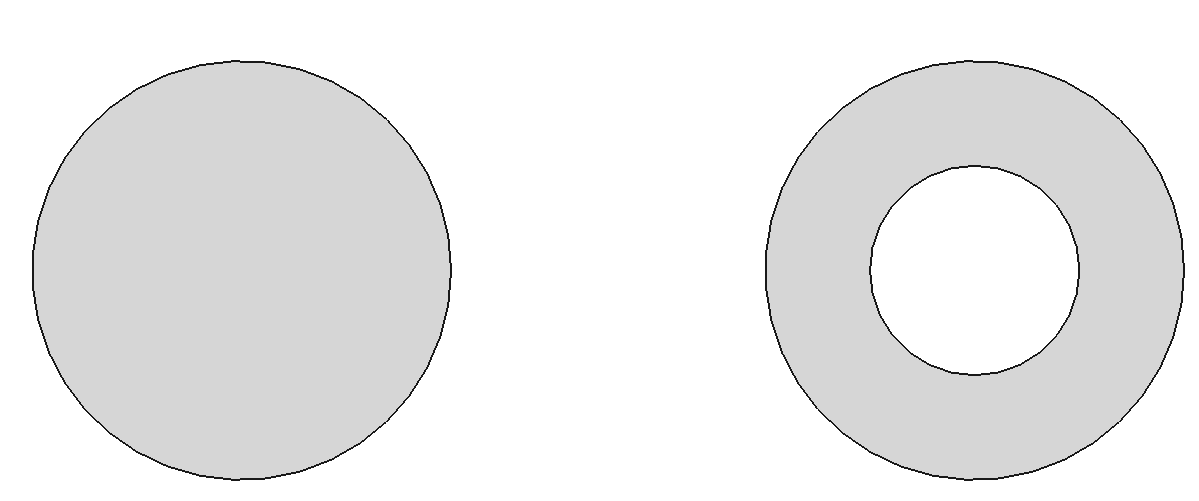
However, it is important to note the orientation of the wire. For example, if the code is written as below, it will produce an incorrect result:

The correct approach is to set the orientation of the edge or wire to Reversed at the edge or wire level.

AMCAX::TopoWire wire2 = AMCAX::MakeWire(circleEdge2);
AMCAX::TopoFace face8 = AMCAX::MakeFace(face7, AMCAX::TopoCast::Wire(wire2.Oriented(AMCAX::OrientationType::Reversed)));
static AMCAX_API const TopoWire & Wire(const TopoShape &s)
Cast shape to wire.
AMCAX_API TopoShape Oriented(OrientationType orient) const
Get the shape with given orientation.