
AMCAX Kernel 1.0.0.0
Loading...
Searching...
No Matches
Parametric Curves and Parametric Surfaces

Definition

Parametric Curves

A parametric curve is described by a parameter t, typically represented as:C(t) = (x(t),y(t),z(t)).Here:t is the parameter, usually defined over an interval [a,b] 上。x(t)、y(t)、z(t) are functions of the parameter t, representing the coordinates of the curve in three-dimensional space.The shape of the curve is described by the variation of the parameter t. Since the parameterization is not unique, the same curve can be represented by different parametric equations.
Below are some examples:
  • Line: C(t) = P0 + t⋅(P1−P0) , t∈[0,1],where P0 and P1 are the start and end points of the line.
  • Circular Arc: C(t) = (rcos(t),rsin(t)) , t∈[0,2π],where r is the radius.
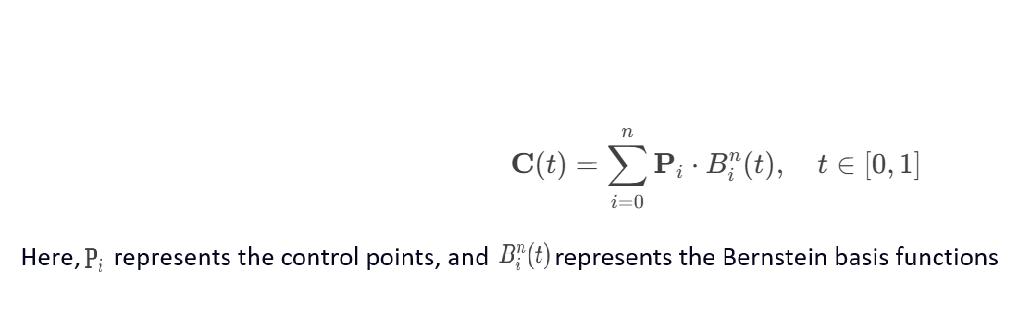
  • Bézier Curve:

Parametric Surfaces

A parametric surface is described by two parameters u and v, typically represented as:S(u,v) = (x(u,v),y(u,v),z(u,v)),here u and v are parameters, usually defined over a domain [a,b]×[c,d],x(u,v)、y(u,v)、z(u,v) are functions of the parameters u and v, representing the coordinates of the surface in three-dimensional space.The shape of the surface is described by the variation of the parameters u and v. Since the parameterization is not unique, the same surface can be represented by different parametric equations.
Below are some examples:
  • Plane: S(u,v) = P0 ​+ u⋅A + v⋅B, u, v∈R ,where P0is a point on the plane, and A and B are the direction vectors of the plane.
  • Sphere: S(u,v) = (rsin(u)cos(v),rsin(u)sin(v),rcos(u)) ,u∈[0,π],v∈[0,2π],where r is the radius.
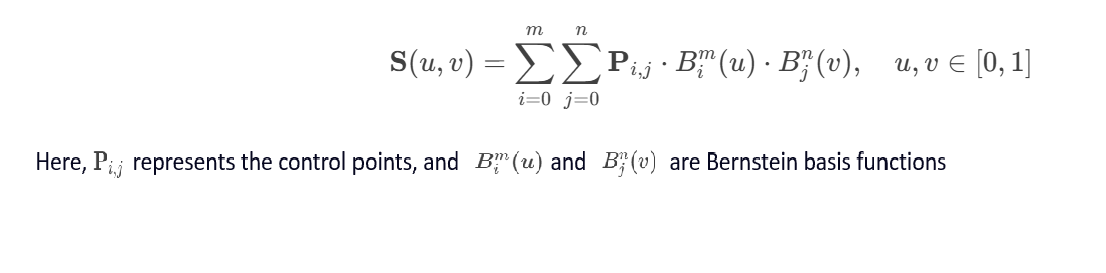
  • Bézier Surface:

Continuity

Parametric Continuity

Curves

Parametric continuity refers to the continuity of the parametric derivatives at the junction of curves. For curves, parametric continuity involves first-order, second-order, and higher-order derivatives. In CAD and geometric modeling, parametric continuity ensures smooth connections between curves. Higher-order parametric continuity (e.g., C2) is often used in fields like automotive and aerospace, where curvature continuity is required.

Definition

  • C⁰ Continuity: The curves are positionally continuous at the junction, but the tangent directions may not be continuous.
  • C¹ Continuity: The curves are positionally and tangentially continuous at the junction (first-order derivatives are continuous).
  • C² Continuity: The curves are positionally, tangentially, and curvature continuous at the junction (second-order derivatives are continuous).

Conditions

For two curves r1(t) and r2(t),at the junction t=t0 :
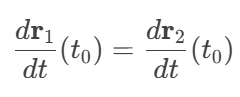
  • C⁰ Continuity: r1(t0) = r2(t0)
  • C¹ Continuity:
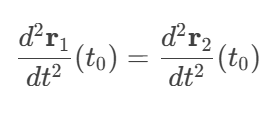
  • C² Continuity:

Surfaces

Parametric continuity refers to the continuity of the parametric derivatives at the junction of surfaces. For surfaces, parametric continuity involves first-order and higher-order partial derivatives in both u and v directions. In CAD and geometric modeling, parametric continuity ensures smooth connections between surfaces. Higher-order parametric continuity (e.g., C2) is often used in fields like automotive and aerospace, where curvature continuity is required.

Definition

  • C⁰ Continuity: The surfaces are positionally continuous at the junction, but the normal vectors may not be continuous.
  • C¹ Continuity: The surfaces are positionally and tangentially continuous at the junction (first-order partial derivatives are continuous).
  • C² Continuity: The surfaces are positionally, tangentially, and curvature continuous at the junction (second-order partial derivatives are continuous).

Conditions

For two surfaces S1(u,v) and S2(u,v),at the junction:
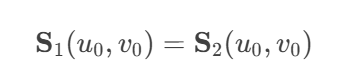
  • C⁰ Continuity:
  • C¹ Continuity:
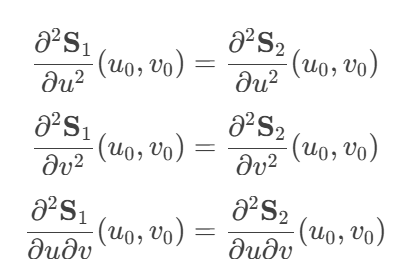
  • C² Continuity:

Geometric Continuity

Curves

Geometric continuity refers to the continuity of geometric properties (e.g., tangent direction, curvature) at the junction of curves, without necessarily requiring parametric derivative continuity. Geometric continuity focuses more on the visual smoothness of the curves. The conditions for geometric continuity are less strict than parametric continuity, making it easier to achieve in some cases.

Definition

  • G⁰ Continuity: The curves are positionally continuous at the junction, but the tangent directions may not be continuous.
  • G¹ Continuity: The curves are positionally continuous at the junction, and the tangent directions are continuous (the directions are the same, but the magnitudes may differ).
  • G² Continuity: The curves are positionally and tangentially continuous at the junction, and the curvature is continuous (the curvature values are the same, but the curvature rates may differ).

Conditions

For two curves r1(t) and r2(t), at the junction t=t0:

  • G⁰ Continuity: r1(t0) = r2(t0)
  • G¹ Continuity: T1(t0) || T2(t0),where T1 and T2 are the unit tangent vectors of the curves.
  • G² Continuity: κ1(t0) = κ2(t0),where κ1 and κ2 are the curvatures of the curves.

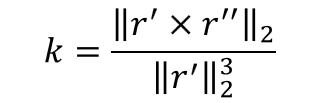
The curvature of a parametric curve is calculated as:

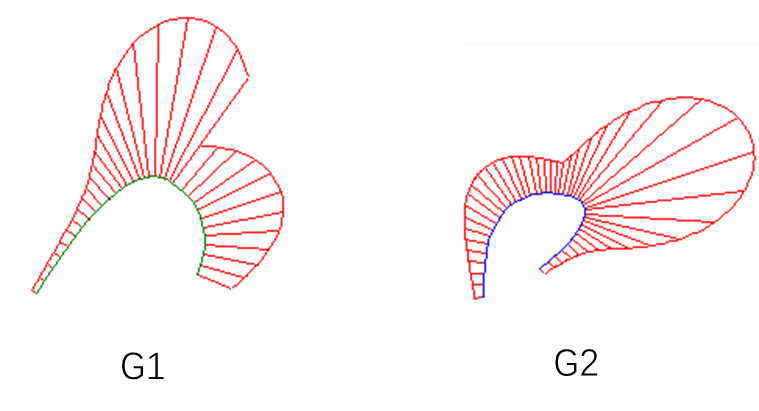
In commercial software, the curvature comb of a curve can be visualized. Curvature continuity corresponds to G2:

Surfaces

Geometric continuity refers to the continuity of geometric properties (e.g., tangent plane, curvature) at the junction of surfaces, without necessarily requiring parametric derivative continuity. Geometric continuity focuses more on the visual smoothness of the surfaces. The conditions for geometric continuity are less strict than parametric continuity, making it easier to achieve in some cases.

Definition

  • G⁰ Continuity: The surfaces are positionally continuous at the junction, but the normal vectors may not be continuous.
  • G¹ Continuity: The surfaces are positionally continuous at the junction, and the normal vectors are continuous (the tangent planes are the same, but the tangent vector magnitudes may differ).
  • G² Continuity: The surfaces are positionally and normally continuous at the junction, and the curvature is continuous (all normal curvatures are the same, but the curvature rates may differ).

Conditions

For two surfaces S1(u,v) and S2(u,v),at the junction:
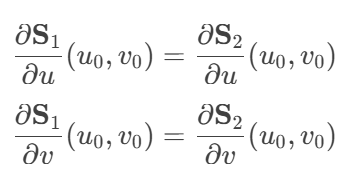
  • G⁰ Continuity:
  • G¹ Continuity:
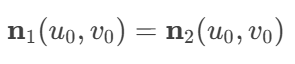
    where n1 and n2 are the normal vectors of the surfaces.
  • G² Continuity:
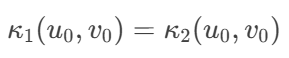
    where κ1 and κ2 are the curvatures of the surfaces.

Additional Notes:
1.Normal Curvature Definition
The normal curvature is defined as the curvature of the intersection curve between the surface and a normal plane (a plane containing the normal vector). The curvature of the curve γ at point p0 is the normal curvature of the surface S at p0 in the direction t.
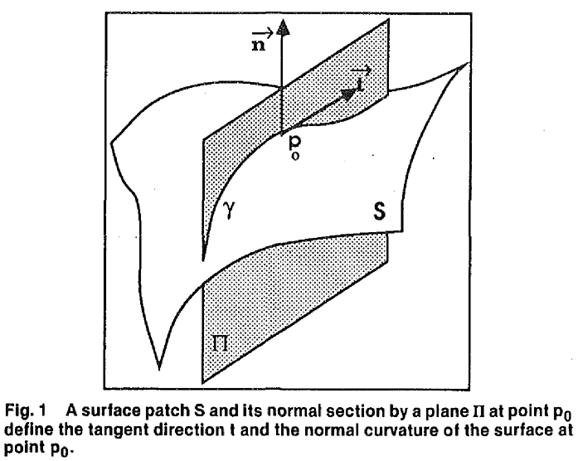
The definition of normal curvature is not easy to calculate. A convenient method to compute the normal curvature is to calculate the coordinates of direction t in the tangent plane, denoted as (α, β), where t = αDu + βDv. The normal curvature is then given by:
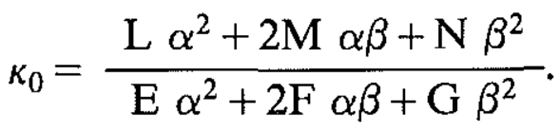
Here, EFG has the same symbolic meaning as in the first fundamental form of the surface, and LMN has the same symbolic meaning as in the second fundamental form of the surface, i.e.:

2.G2 Continuity means that the normal curvature in all directions at any point on the connecting curve is the same.
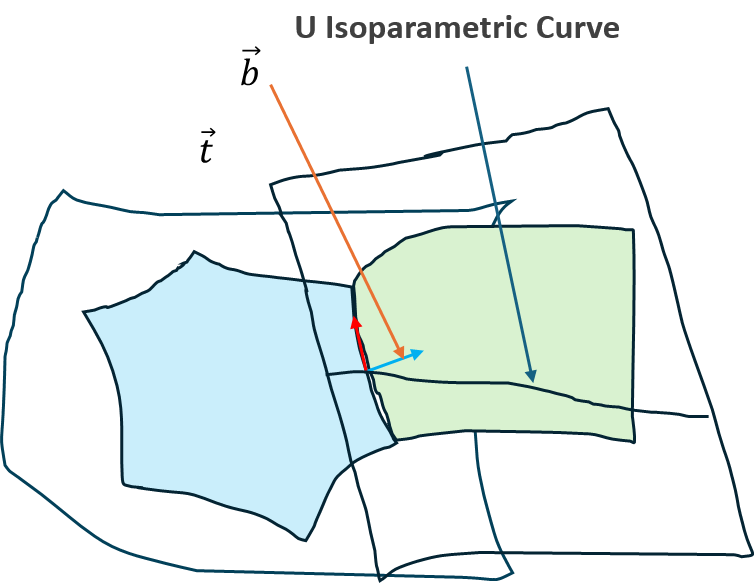
However, requiring the normal curvature in all directions to be the same is a very strong condition. The Link Curvature Theorem proves that if the normal curvature is equal in one direction that is not collinear with t, then the normal curvature in all directions will be equal. Therefore, by considering only the normal vector b of t, if the normal curvature in the b direction is the same, then the curve is G2 continuous.

3.Manifestation of Surface G2 Continuity
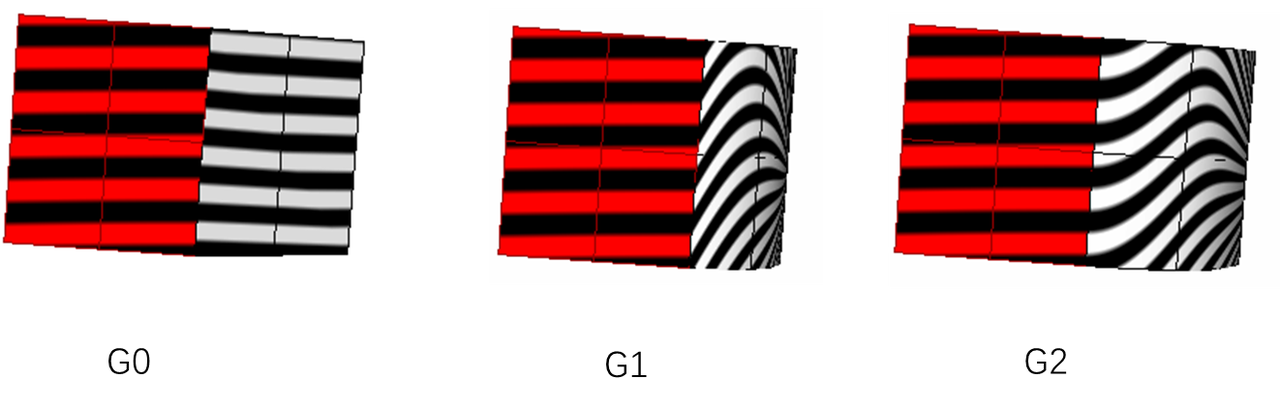
Whether a surface is G2 continuous can be approximated by optical effects. The zebra stripes for G0 continuity are broken, for G1 continuity, the stripes are connected but not smooth, and for G2 continuity, the stripes are connected and smooth.
More Practical Expressions of Geometric Continuity

From the definitions of geometric continuity, some more practical conclusions can be derived:

  • 1. For curve a and curve b at their connection point, if the first derivative at the connection point is d1 and the second derivative is d2, then if the first derivative of curve b at the connection point is a * d1, it is G1 continuous. If the first derivative of curve b is a * d1 and the second derivative is a * a * d2 + b * d1, then it is G2 continuous, where a is a non-negative real number and b is a real number. This conclusion shows that the G2 continuity of a curve can be controlled by two parameters, and the implementation is C2.
  • 2. If surface a and surface b are connected at the u boundary and are G1 continuous, and at a connection point on surface a, the first derivative in the u direction is du and the second derivative is duu, and the first derivative of surface b at the connection point in the u direction is a * du, and the second derivative is a * a * duu + b * du, then it is G2 continuous, where a is a non-negative real number and b is a real number. This conclusion shows that the G2 continuity at the boundary of a surface can be controlled by two parameters, and the implementation is C2.

2D Parametric Curve

Common Functions

Obtaining Parameter Range

AMCAX::Geom2Curve::FirstParameter is used to obtain the starting parameter of the curve, and AMCAX::Geom2Curve::LastParameter is used to obtain the ending parameter of the curve.

//1
//Make a 2D BSplineCurve
std::vector<AMCAX::Point2> pts22 = {
AMCAX::Point2(0.5, 0.5),
AMCAX::Point2(1.0, 3.0),
AMCAX::Point2(3.0, 1.0),
AMCAX::Point2(3.8,2.0),
AMCAX::Point2(2.5,3.5),
AMCAX::Point2(1.0,0.5),
AMCAX::Point2(0.3,2.0)
};
std::vector<double> knots = { 0.0, 0.25, 0.5,0.75,1.0 };
std::vector<int> mults = { 4, 1, 1,1,4 };
std::shared_ptr< AMCAX::Geom2BSplineCurve> bspline2 = std::make_shared< AMCAX::Geom2BSplineCurve>(pts22, knots, mults, 3);
//Get the FirstParameter and LastParameter
double fp = bspline2->FirstParameter();
double lp = bspline2->LastParameter();
std::cout << fp <<"," << lp << std::endl;//0,1
//2
//Make a trimcurve
std::shared_ptr< AMCAX::Geom2Parabola >parabola2 = std::make_shared< AMCAX::Geom2Parabola>(AMCAX::Frame2(), 2.0);
AMCAX::Geom2TrimmedCurve trimcurve(parabola2, -2.0, 2.0);
//Get the FirstParameter and LastParameter
double fp2 = trimcurve.FirstParameter();
double lp2 = trimcurve.LastParameter();
std::cout << fp2 << "," << lp2 << std::endl;//-2,2
Class of 2D trimmed curve.
Definition Geom2TrimmedCurve.hpp:12
FrameT< double, 2 > Frame2
2D frame
Definition FrameT.hpp:884
PointT< double, 2 > Point2
2D point
Definition PointT.hpp:456

Evaluation and Differentiation

AMCAX::Geom2Curve::Value or AMCAX::Geom2Curve::D0 are used for evaluation, while AMCAX::Geom2Curve::D1, AMCAX::Geom2Curve::D2, AMCAX::Geom2Curve::D3, AMCAX::Geom2Curve::DN are used for differentiation.

//1
//Value
double t = 0.4 * (fp + lp);
AMCAX::Point2 p1 = bspline2->Value(t);
//D0 D1 D2 D3 DN
AMCAX::Vector2 d1, d2, d3;
bspline2->D0(t, p2);
bspline2->D1(t, p2, d1);
bspline2->D2(t, p2, d1, d2);
bspline2->D3(t, p2, d1, d2, d3);
int deriv = 4;
AMCAX::Vector2 dn = bspline2->DN(t, deriv);
//2
//Value
double t2 = 1.5;
AMCAX::Point2 p3 = trimcurve.Value(t2);
//D0 D1 D2 D3 DN
AMCAX::Vector2 dd1, dd2, dd3;
trimcurve.D0(t2, p4);
trimcurve.D1(t2, p4, dd1);
trimcurve.D2(t2, p4, dd1, dd2);
trimcurve.D3(t2, p4, dd1, dd2, dd3);
int deriv2 = 4;
AMCAX::Vector2 ddn = trimcurve.DN(t2, deriv2);
VectorT< double, 2 > Vector2
2D vector
Definition VectorT.hpp:704

Getting Curve Type

AMCAX::Geom2Curve::Type is used to obtain the type of the curve, such as line, circle, ellipse, parabola, etc. Curve types can be referenced from the enum class CurveType.

std::cout << int(bspline2->Type()) << ";" << int(trimcurve.Type());//7;8

Closedness and Periodicity

AMCAX::Geom2Curve::IsClosed is used to determine whether the curve is closed (whether the start and end points are the same), and AMCAX::Geom2Curve::IsPeriodic is used to determine if the curve is periodic.

std::cout <<bspline2->IsClosed()<< ";" << bspline2->IsPeriodic();//0;0
std::cout <<trimcurve.IsClosed()<< ";" << trimcurve.IsPeriodic();//0;0

Reversal

AMCAX::Geom2Curve::Reverse is used to reverse the Geom2Curve and change it, while AMCAX::Geom2Curve::Reversed returns the reversed Geom2Curve without modifying the original. After reversing, the start and end points of the curve are swapped. For general curves, the parameter range remains unchanged, but for trimmed curves, the parameter range might change. For example, a trimmed line with a parameter range from -1 to 3 will have its range reversed to -3 to 1.

//1
std::vector<AMCAX::Point2> pts3 = {
AMCAX::Point2(0.0, 0.0),
AMCAX::Point2(2.0, 2.0),
AMCAX::Point2(4.0, 3.0),
};
auto bezier2 = std::make_shared<AMCAX::Geom2BezierCurve>(pts3);
std::cout << bezier2->FirstParameter() << std::endl;//0
std::cout << bezier2->LastParameter() << std::endl;//1
// reversed
auto reversebezier = bezier2->Reversed();
std::cout << reversebezier->FirstParameter() << std::endl;//0
std::cout << reversebezier->LastParameter() << std::endl;//1
std::cout << reversebezier->Value(0) << std::endl;//4 3
std::cout << reversebezier->Value(1) << std::endl;//0 0
//reverse
bezier2->Reverse();
std::cout << bezier2->FirstParameter() << std::endl;//0
std::cout << bezier2->LastParameter() << std::endl;//1
std::cout << bezier2->StartPoint() << std::endl;//4 3
std::cout << bezier2->EndPoint() << std::endl;//0 0
//2
auto line2 = std::make_shared<AMCAX::Geom2Line>(AMCAX::Point2(0., 0.), AMCAX::Direction2(1., 0.));
auto trimline2 = std::make_shared<AMCAX::Geom2TrimmedCurve>(line2, -1., 3.);
std::cout << trimline2->StartPoint() << std::endl;//-1 0
std::cout << trimline2->EndPoint()<< std::endl;//3 0
// reversed
auto reverseline = trimline2->Reversed();
std::cout << reverseline->FirstParameter() << std::endl;//-3
std::cout << reverseline->LastParameter() << std::endl;//1
std::cout << reverseline->Value(-3) << std::endl;//3 0
std::cout << reverseline->Value(1) << std::endl;//-1 0
//reverse
trimline2->Reverse();
std::cout << trimline2->FirstParameter() << std::endl;//-3
std::cout << trimline2->LastParameter() << std::endl;//1
std::cout << trimline2->StartPoint() << std::endl;//3 0
std::cout << trimline2->EndPoint() << std::endl;//-1 0
DirectionT< double, 2 > Direction2
2D direction
Definition DirectionT.hpp:563

Here, we explain the reason why the parameter range of a trimmed line changes from -3 to 1 after reversal. This is because, when reversing a trimmed curve, it first reverses its basiscurve (the infinitely long line) and then determines the reversed parameter range based on the start and end parameters of the trimmed curve.

Additionally, to calculate the symmetric parameter for a given parameter, you can use AMCAX::Geom2Curve::ReversedParameter:

std::cout<<trimline2->ReversedParameter(0.5)<<std::endl;//-0.5

Subclasses

Except for Geom2OffsetCurve, the others are similar to their 3D counterparts.

Geom2Line

Geom2Line is an infinitely long 2D line defined by a Point2 and a Direction2. The parameter at Point2 is 0.0, and the parameter increases in the direction of Direction2. The parameter variation corresponds to the length variation. The parameter domain of the line is infinite.

auto line = std::make_shared<AMCAX::Geom2Line>(AMCAX::Point2(0., 1.), AMCAX::Direction2(1., 2.));
auto trimline = std::make_shared<AMCAX::Geom2TrimmedCurve>(line, 0.0, 1.0);
Class of making a 2D edge.
Definition MakeEdge2d.hpp:24
static AMCAX_API bool Write(const TopoShape &s, std::ostream &os, int format=3)
Write a shape to a stream.

Geom2Circle

Geom2Circle is a circle in 2D space, defined by a frame and a radius. It represents a standard circle in the XOY plane of the frame (the center at the frame origin, the point on the x-axis when the parameter is 0, and the point rotates counterclockwise as the parameter increases). The parameter domain of the circle is [0, 2*pi), representing the parametric coordinates of the circle.

auto circle = std::make_shared<AMCAX::Geom2Circle>(AMCAX::Frame2(), 1.0);

Geom2Ellipse

Geom2Ellipse is an ellipse in 2D space, defined by a frame and the major and minor radii. It represents a standard ellipse in the XOY plane of the frame (the center at the frame origin, the point on the x-axis when the parameter is 0, and the point rotates counterclockwise as the parameter increases). The parameter domain of the ellipse is [0, 2*pi), representing the parametric coordinates of the ellipse.

auto ellipse = std::make_shared<AMCAX::Geom2Ellipse>(AMCAX::Frame2(), 2.0,1.0);

Geom2Hyperbola

Geom2Hyperbola is the right branch of a hyperbola in 2D space, defined by a frame and the radii of the real and imaginary axes. It represents the right branch of a standard hyperbola in the XOY plane of the frame (the center at the frame origin, the point on the positive x-axis when the parameter is 0, and the point moves along the right branch of the hyperbola as the parameter increases. As the parameter increases, the y-coordinate in the XOY plane also increases). To obtain the left branch of the hyperbola, you can use AMCAX::Geom2Hyperbola::OtherBranch. The parameter domain of the hyperbola is [-∞, +∞], representing the parametric coordinates of the hyperbola.

auto hyperbola = std::make_shared<AMCAX::Geom2Hyperbola>(AMCAX::Frame2(), 2.0, 1.0);
auto trimhyperbola = std::make_shared<AMCAX::Geom2TrimmedCurve>(hyperbola, 0.0, 2.0);
AMCAX::Hyperbola2 otherbranch= hyperbola->OtherBranch();
AMCAX::OCCTIO::OCCTTool::Write(AMCAX::MakeEdge2d(trimhyperbola), "trimhyperbola.brep");
AMCAX::OCCTIO::OCCTTool::Write(AMCAX::MakeEdge2d(otherbranch,0.0,2.0), "otherbranch.brep");
HyperbolaS< 2 > Hyperbola2
2D hyperbola
Definition HyperbolaT.hpp:327

Geom2Parabola

Geom2Parabola is a parabola in 2D space, defined by a frame and the focal distance. It represents a standard parabola in the XOY plane of the frame (the vertex at the frame origin, with the axis of symmetry along the x-axis, the point at the origin when the parameter is 0, and the point moves along the parabola as the parameter increases. As the parameter increases, the y-coordinate in the XOY plane also increases). The parameter domain of the parabola is [-∞, +∞], representing the parametric coordinates of the parabola.

auto parabola = std::make_shared<AMCAX::Geom2Parabola>(AMCAX::Frame2(), 1.0);
auto trimparabola = std::make_shared<AMCAX::Geom2TrimmedCurve>(hyperbola, -2.0, 2.0);
AMCAX::OCCTIO::OCCTTool::Write(AMCAX::MakeEdge2d(trimparabola), "trimparabola.brep");

Geom2BezierCurve

Geom2BezierCurve is a Bezier curve in 2D space, defined by control points and optional weights. The degree of the curve is the number of control points minus one; for example, with 4 control points, the curve is a 3rd degree Bezier curve. The parameter domain of a Bezier curve is [0,1]. When the parameter t = 0, the curve is at the start point (the first control point), and when t = 1, the curve is at the endpoint (the last control point). For standard Bezier curves, the node vector is {0, 1}, and the multiplicity of each node is the degree + 1.

std::vector<AMCAX::Point2> pts = {
AMCAX::Point2(0.0, 0.0),
AMCAX::Point2(2.0, 2.0),
AMCAX::Point2(4.0, 3.0),
};
auto bezier = std::make_shared<AMCAX::Geom2BezierCurve>(pts);

Geom2BSplineCurve

Geom2BSplineCurve is a B-Spline curve in 2D space, defined by control points, knots, knot multiplicities, curve degree, and optional weights.

std::vector<AMCAX::Point2> pts2 = {
AMCAX::Point2(0.5, 0.5),
AMCAX::Point2(1.0, 3.0),
AMCAX::Point2(3.0, 1.0),
AMCAX::Point2(3.8,2.0),
AMCAX::Point2(2.5,3.5),
AMCAX::Point2(1.0,0.5),
AMCAX::Point2(0.3,2.0)
};
std::vector<double> knots2 = { 0.0, 0.25, 0.5,0.75,1.0 };
std::vector<int> mults2 = { 4, 1, 1,1,4 };
auto bspline = std::make_shared< AMCAX::Geom2BSplineCurve>(pts2, knots2, mults2, 3);

Geom2TrimmedCurve

Geom2TrimmedCurve is a trimmed curve in 2D space, defined by an original curve and two trimming parameters. Similar to 3D, the trimmed curve is always non-periodic, and periodic curves can be trimmed beyond the domain. For example, for a circle:

auto circle = std::make_shared<AMCAX::Geom2Circle>(AMCAX::Frame2(), 1.0);
auto trimcircle2 = std::make_shared<AMCAX::Geom2TrimmedCurve>(circle, -AMCAX::Constants::pi / 4, AMCAX::Constants::pi * 3 / 4);
AMCAX::OCCTIO::OCCTTool::Write(AMCAX::MakeEdge2d(trimcircle2), "trimcircle2.brep");
constexpr double pi
Mathematical constant Pi, ratio of a circle's circumference to its diameter.
Definition Constants.hpp:42

Geom2OffsetCurve

Geom2OffsetCurve is an offset curve in 2D space, defined by the original curve and an offset distance. The offset direction is a 90° clockwise rotation of the tangent. Additionally, to obtain the original curve of the offset curve, you can use AMCAX::Geom2OffsetCurve::BasisCurve .

auto circle2 = std::make_shared<AMCAX::Geom2Circle>(AMCAX::Frame2(), 2.0);
//Get the 2D offset curve
double offset = 1.5;
auto circleoffset = std::make_shared<AMCAX::Geom2OffsetCurve>(circle2, offset);
AMCAX::OCCTIO::OCCTTool::Write(AMCAX::MakeEdge2d(circleoffset), "circleoffset.brep");
//Get the basiscurve
auto basiscircle = circleoffset->BasisCurve();

3D Parametric Curve

Common Functions

Obtaining Parameter Range

AMCAX::Geom3Curve::FirstParameter is used to obtain the starting parameter of the curve, and AMCAX::Geom3Curve::LastParameter is used to obtain the ending parameter of the curve.

//1
//Make a 3D BSplineCurve
std::vector<AMCAX::Point3> pts22 = {
AMCAX::Point3(0.5, 0.5,0.3),
AMCAX::Point3(1.0, 3.0,0.4),
AMCAX::Point3(3.0, 1.0,0.1),
AMCAX::Point3(3.8,2.0,0.6),
AMCAX::Point3(2.5,3.5,0.8),
AMCAX::Point3(1.0,0.5,0.9),
AMCAX::Point3(0.3,2.0,0.5)
};
std::vector<double> weights = { 1.0, 2.0, 3.0, 4.0, 3.0, 2.0, 1.0 };
std::vector<double> knots = { 0.0, 0.25, 0.5, 1.0 };
std::vector<int> mults = { 4, 1, 2, 4 };
std::shared_ptr< AMCAX::Geom3BSplineCurve> bspline = std::make_shared< AMCAX::Geom3BSplineCurve>(pts22, weights, knots, mults, 3);
//Get the FirstParameter and LastParameter
double fp = bspline->FirstParameter();
double lp = bspline->LastParameter();
std::cout << fp <<"," << lp << std::endl;//0,1
//2
//Make a trimcurve
std::shared_ptr< AMCAX::Geom3Parabola >parabola = p.Value();
AMCAX::Geom3TrimmedCurve trimcurve(parabola, -2.0, 2.0);
//Get the FirstParameter and LastParameter
double fp2 = trimcurve.FirstParameter();
double lp2 = trimcurve.LastParameter();
std::cout << fp2 << "," << lp2 << std::endl;//-2,2
Class of 3D trimmed curve.
Definition Geom3TrimmedCurve.hpp:12
Class of making 3D geometric parabolas.
Definition MakeGeom3Parabola.hpp:13
PointT< double, 3 > Point3
3D point
Definition PointT.hpp:459
FrameT< double, 3 > Frame3
3D frame
Definition FrameT.hpp:887

Evaluation and Differentiation

AMCAX::Geom3Curve::Value or AMCAX::Geom3Curve::D0 is used for evaluation, while AMCAX::Geom3Curve::D1, AMCAX::Geom3Curve::D2, AMCAX::Geom3Curve::D3, and AMCAX::Geom3Curve::DN are used for differentiation.

//1
//Value
double t = 0.4 * (fp + lp);
AMCAX::Point3 p1 = bspline->Value(t);
//D0 D1 D2 D3 DN
AMCAX::Vector3 d1, d2, d3;
bspline->D0(t, p2);
bspline->D1(t, p2, d1);
bspline->D2(t, p2, d1, d2);
bspline->D3(t, p2, d1, d2, d3);
int deriv = 4;
AMCAX::Vector3 dn = bspline->DN(t, deriv);
//2
//Value
double t2 = 1.5;
AMCAX::Point3 p3 = trimcurve.Value(t2);
//D0 D1 D2 D3 DN
AMCAX::Vector3 dd1, dd2, dd3;
trimcurve.D0(t2, p4);
trimcurve.D1(t2, p4, dd1);
trimcurve.D2(t2, p4, dd1, dd2);
trimcurve.D3(t2, p4, dd1, dd2, dd3);
int deriv2 = 4;
AMCAX::Vector3 ddn = trimcurve.DN(t2, deriv2);
VectorT< double, 3 > Vector3
3D vector
Definition VectorT.hpp:707

Obtaining Type

AMCAX::Geom3Curve::Type is used to obtain the type of the curve, such as line, circle, ellipse, parabola, etc. The curve types can be referred to the enumeration class CurveType.

std::cout << int(bspline->Type()) << ";" << int(trimcurve.Type());//7;8

Closedness and Periodicity

AMCAX::Geom3Curve::IsClosed is used to determine if the curve is closed (the starting point and the ending point are the same), and AMCAX::Geom3Curve::IsPeriodic is used to determine if the curve is periodic.

std::cout <<bspline->IsClosed()<< ";" << bspline->IsPeriodic();//0;0
std::cout <<trimcurve.IsClosed()<< ";" << trimcurve.IsPeriodic();//0;0

Reverse

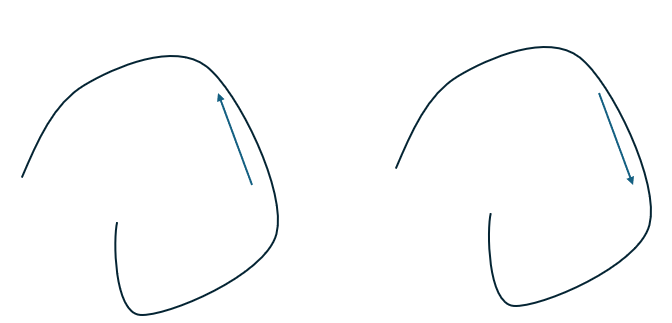
AMCAX::Geom3Curve::Reverse is used to reverse the Geom3Curve, modifying itself, while AMCAX::Geom3Curve::Reversed is used to obtain a reversed Geom3Curve without altering the original. After reversal, the starting and ending points of the curve are swapped. For general curves, the parameter range of the curve remains unchanged, whereas for trimmed curves, the parameter range may change. For example, a trimmed line originally with a parameter range from -1 to 3 will have a parameter range from -3 to 1 after reversal.
//1
//reversed
auto reverse = bspline->Reversed();
double fp3 = reverse->FirstParameter();
double lp3 = reverse->LastParameter();
std::cout << fp3 << "," << lp3 << std::endl;//0,1
std::cout << bspline->Value(fp) << std::endl;//0.5 0.5 0.3
std::cout << bspline->Value(lp) << std::endl;//0.3 2 0.5
std::cout<<reverse->Value(fp3)<<std::endl;//0.3 2 0.5
std::cout<<reverse->Value(lp3)<<std::endl;//0.5 0.5 0.3
//reverse
bspline->Reverse();
double fp4 = bspline->FirstParameter();
double lp4 = bspline->LastParameter();
std::cout << fp4 << "," << lp4 << std::endl;//0,1
std::cout << reverse->Value(fp4) << std::endl;//0.3 2 0.5
std::cout << reverse->Value(lp4) << std::endl;//0.5 0.5 0.3
//2
auto line2 = std::make_shared<AMCAX::Geom3Line>(AMCAX::Point3(0., 0., 0.), AMCAX::Direction3(1., 0., 0.));
auto trimline2 = std::make_shared<AMCAX::Geom3TrimmedCurve>(line2, -1.0, 3.0);
std::cout << trimline2->Value(-1.0) << std::endl;//-1 0 0
std::cout << trimline2->Value(3.0) << std::endl;//3 0 0
//reversed
auto reverse2 = trimline2->Reversed();
double fp5 = reverse2->FirstParameter();
double lp5 = reverse2->LastParameter();
std::cout << fp5 << "," << lp5 << std::endl;//-3,1
std::cout << reverse2->Value(fp5) << std::endl;//3 0 0
std::cout << reverse2->Value(lp5) << std::endl;//-1 0 0
//reverse
trimline2->Reverse();
double fp6 = trimline2->FirstParameter();
double lp6 = trimline2->LastParameter();
std::cout << fp6 << "," << lp6 << std::endl;//-3,1
std::cout << trimline2->Value(fp6) << std::endl;//3 0 0
std::cout <<trimline2->Value(lp6) << std::endl;//-1 0 0
DirectionT< double, 3 > Direction3
3D direction
Definition DirectionT.hpp:566

Here, we explain why the parameter range of the trimmed line changes to -3 to 1 after reversal. This is because when reversing a trimmed curve, the reversal is first applied to its basis curve (an infinitely long line), and then the parameters of the reversed starting and ending points are used to determine the parameter range after reversal.

Additionally, if you want to calculate the symmetric parameter for a given parameter, you can use AMCAX::Geom3Curve::ReversedParameter to achieve this.

std::cout << trimline->ReversedParameter(0.5) << std::endl;//-0.5

Subclasses

Geom3Line

Geom3Line is an infinitely long 3D line defined by a Point3 and a Direction3. The parameter at the Point3 is 0.0, and the parameter is positive in the direction of Direction3, with the parameter varying consistently with the length. The parameter domain of the line is infinite.
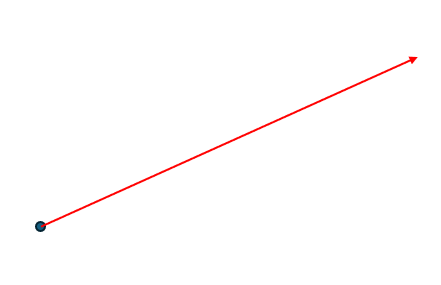
auto line = std::make_shared<AMCAX::Geom3Line>(AMCAX::Point3(0., 1., 1.), AMCAX::Direction3(1., 2., 3.));
auto trimline = std::make_shared<AMCAX::Geom3TrimmedCurve>(line, 0.0, 1.0);
AMCAX::OCCTIO::OCCTTool::Write(AMCAX::MakeEdge(trimline), "trimline.brep");
Class of making an edge.
Definition MakeEdge.hpp:26

Geom3Circle

Geom3Circle is a circle in 3D space, defined by a frame and a radius, i.e., a standard circle on the XOY plane of the frame (with the center at the origin of the frame, and a point on the circle lying on the x-axis when the parameter is 0, rotating counterclockwise as the parameter increases). The parameter domain of the circle is [0, 2*pi), representing the parametric coordinates of the circle.
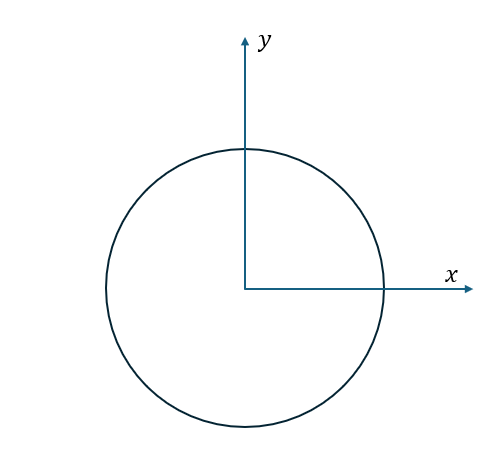
auto circle = std::make_shared<AMCAX::Geom3Circle>(AMCAX::Frame3(), 1.0);

Geom3Ellipse

Geom3Ellipse is an ellipse in 3D space, defined by a frame and its major and minor radii, i.e., a standard ellipse on the XOY plane of the frame (with the center at the origin of the frame, and a point on the ellipse lying on the x-axis when the parameter is 0, rotating counterclockwise as the parameter increases). The parameter domain of the ellipse is [0, 2*pi), representing the parametric coordinates of the ellipse.
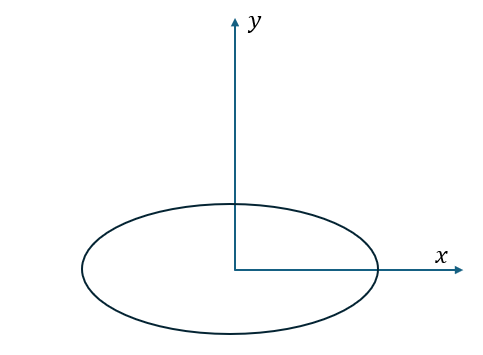
auto ellipse = std::make_shared<AMCAX::Geom3Ellipse>(AMCAX::Frame3(), 2.0,1.0);

Geom3Hyperbola

Geom3Hyperbola represents the right branch of a hyperbola in 3D space, defined by a frame and the radii of the real and imaginary axes, i.e., the right branch of a standard hyperbola on the XOY plane of the frame (with the center at the origin of the frame, and a point on the hyperbola lying on the positive half of the x-axis when the parameter is 0, rotating counterclockwise as the parameter increases, and the y-coordinate on the XOY plane becoming larger as the parameter increases). If you want to obtain the left branch of the hyperbola, you can use AMCAX::Geom3Hyperbola::OtherBranch. The parameter domain of the hyperbola is [-∞, +∞], representing the parametric coordinates of the hyperbola.
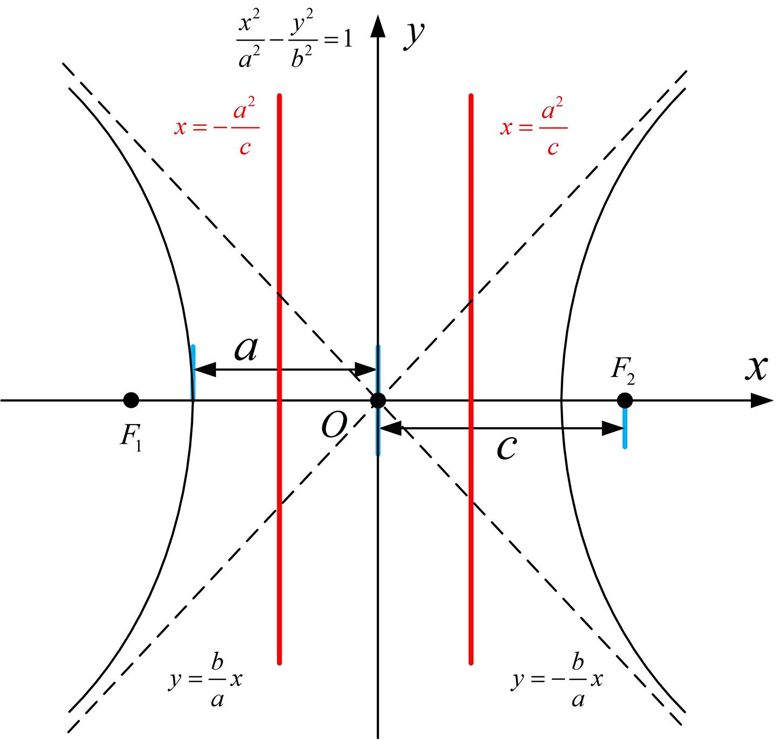
auto hyperbola = std::make_shared<AMCAX::Geom3Hyperbola>(AMCAX::Frame3(), 2.0, 1.0);
auto trimhyperbola = std::make_shared<AMCAX::Geom3TrimmedCurve>(hyperbola, 0.0, 2.0);
AMCAX::OCCTIO::OCCTTool::Write(AMCAX::MakeEdge(trimhyperbola), "trimhyperbola.brep");

Geom3Parabola

Geom3Parabola is a parabola in 3-dimensional space, defined by a reference frame and focal distance. Specifically, it is the standard parabola in the XOY plane of the reference frame (with the vertex at the origin of the reference frame, the axis of symmetry along the x-axis, and a parameter of 0 corresponding to a point on the parabola at the origin). As the parameter increases, the point moves along the parabola, and the y-coordinate on the XOY plane increases with larger parameter values. The domain of the parameter for the parabola is [-∞, +∞], representing the parameter coordinates of the parabola.
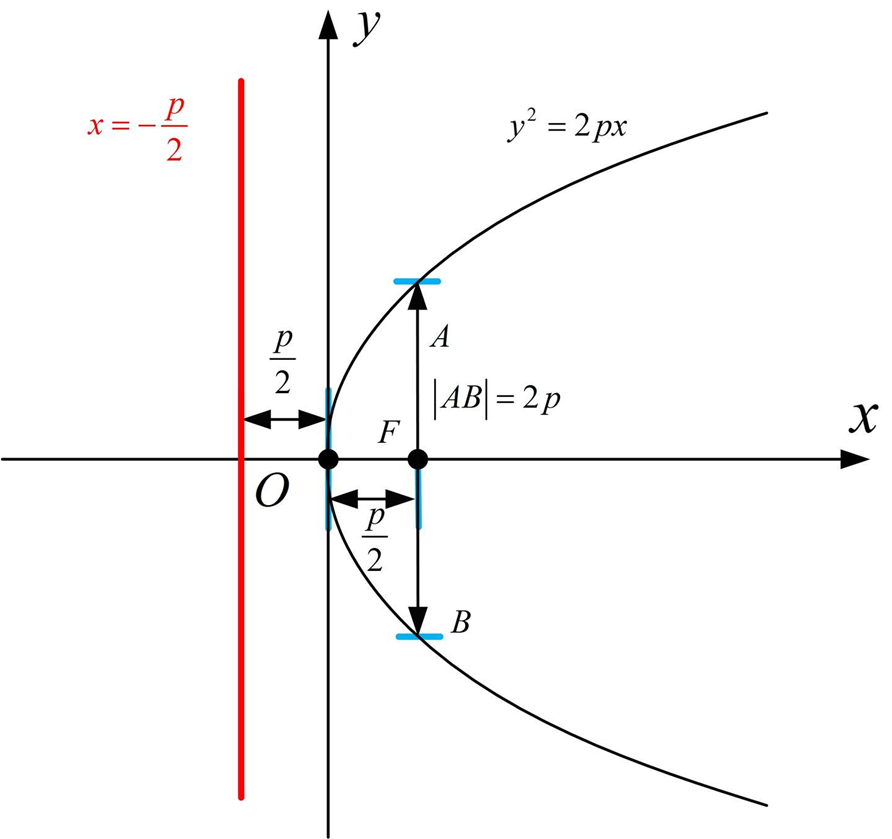
auto parabola2 = std::make_shared<AMCAX::Geom3Parabola>(AMCAX::Frame3(), 1.0);
auto trimparabola = std::make_shared<AMCAX::Geom3TrimmedCurve>(parabola2, -2.0, 2.0);
AMCAX::OCCTIO::OCCTTool::Write(AMCAX::MakeEdge(trimparabola), "trimparabola.brep");

Geom3BezierCurve

Geom3BezierCurve is a Bezier curve in 3D space, defined by control points and optional weights. The degree of the curve is one less than the number of control points; for example, if there are 4 control points, the curve is a cubic Bezier curve. Additionally, the parameter domain of the Bezier curve is [0,1]. When the parameter t=0, the curve is at the starting point (the first control point), and when t=1, the curve is at the ending point (the last control point). For a standard Bezier curve, its knot vector is {0, 1}, and the multiplicity of each knot is the degree plus one.
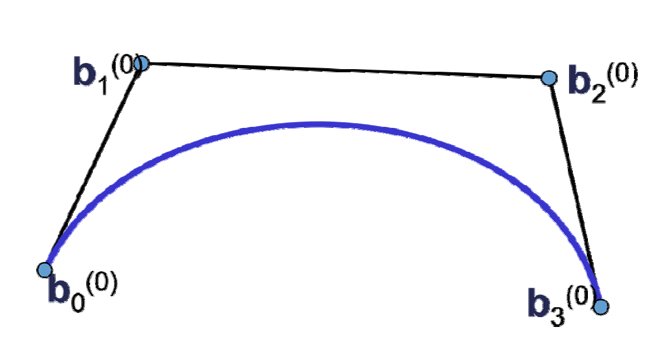
std::vector<AMCAX::Point3> pts3 = {
AMCAX::Point3(0.0, 0.0,0.0),
AMCAX::Point3(2.0, 2.0,2.0),
AMCAX::Point3(4.0, 3.0,5.0),
AMCAX::Point3(6.0,2.0,4.0)
};
auto bezier = std::make_shared<AMCAX::Geom3BezierCurve>(pts3);

Geom3BSplineCurve

Geom3BSplineCurve is a BSpline curve in 3D space, defined by control points, a knot vector, knot multiplicities, and optional weights.
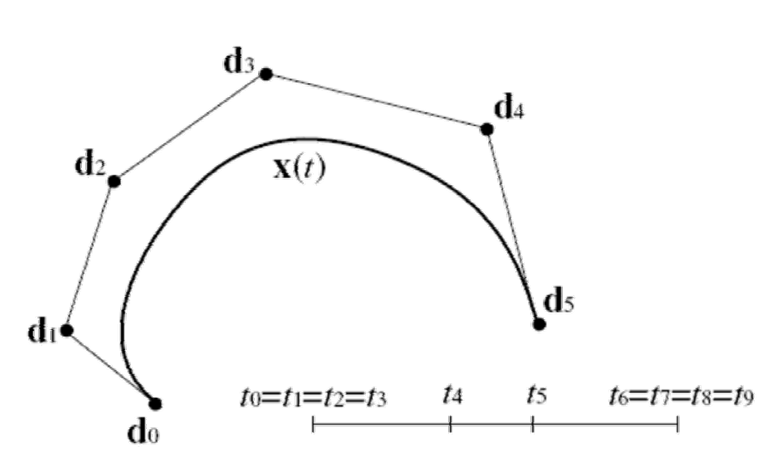
std::vector<AMCAX::Point3> pts = {
AMCAX::Point3(0.5, 0.5,0.3),
AMCAX::Point3(1.0, 3.0,0.4),
AMCAX::Point3(3.0, 1.0,0.1),
AMCAX::Point3(3.8,2.0,0.6),
AMCAX::Point3(2.5,3.5,0.8),
AMCAX::Point3(1.0,0.5,0.9),
AMCAX::Point3(0.3,2.0,0.5)
};
std::vector<double> weights2 = { 1.0, 2.0, 3.0, 4.0, 3.0, 2.0, 1.0 };
std::vector<double> knots2 = { 0.0, 0.25, 0.5, 1.0 };
std::vector<int> mults2 = { 4, 1, 2, 4 };
auto bspline2 = std::make_shared< AMCAX::Geom3BSplineCurve>(pts, weights2, knots2, mults2, 3);

Geom3TrimmedCurve

Geom3TrimmedCurve is a trimmed curve in 3D space, consisting of the original curve and two trimming parameters. It should be noted that the trimmed curve is always non-periodic, even if the trimming is done on a circle with the parameters [0, 2pi]. Additionally, periodic curves can be trimmed beyond their defined domain, such as with a circle.

auto circle = std::make_shared<AMCAX::Geom3Circle>(AMCAX::Frame3(), 1.0);
auto trimcircle2 = std::make_shared<AMCAX::Geom3TrimmedCurve>(circle, -AMCAX::Constants::pi / 4, AMCAX::Constants::pi * 3 / 4);
AMCAX::OCCTIO::OCCTTool::Write(AMCAX::MakeEdge(trimcircle2), "trimcircle2.brep");

Geom3OffsetCurve

Geom3OffsetCurve is an offset curve in 3D space, composed of the original curve, offset distance, and reference direction. Its function is to offset the original curve by a specified distance in a direction perpendicular to the tangent, with the offset direction being the cross product of the tangent and the reference direction, as shown in the figure below. Here, the blue arrow represents the tangent, the green arrow represents the reference direction, and the red arrow represents the cross product direction, which is the offset direction.
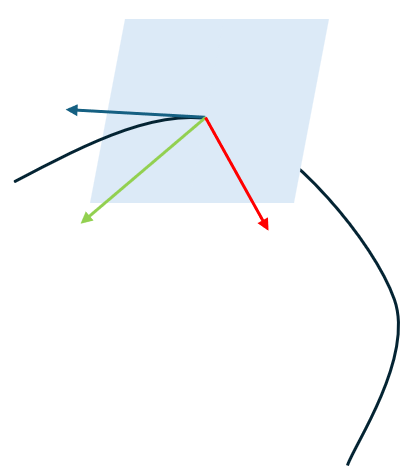
Taking a standard circle on the xoy plane as an example, when the reference direction is oz, the offset direction is outward. Below is the result after offsetting:
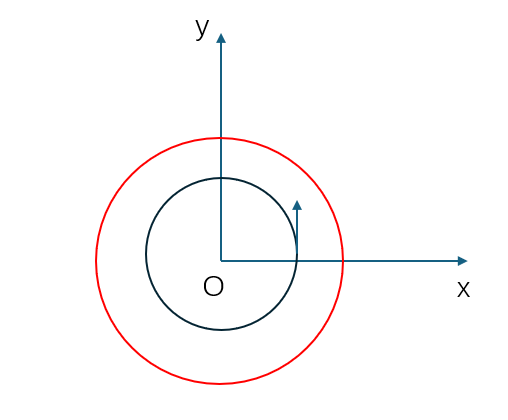
Additionally, if you want to obtain the original curve of the offset curve, you can use AMCAX::Geom3OffsetCurve::BasisCurve.

auto circle2 = std::make_shared<AMCAX::Geom3Circle>(AMCAX::Frame3(), 2.0);
//Get the 3D offset curve
double offset = 1.5;
AMCAX::Direction3 direction(0.0, 0.0, 1.0);
auto circleoffset = std::make_shared<AMCAX::Geom3OffsetCurve>(circle2, offset, direction);
AMCAX::OCCTIO::OCCTTool::Write(AMCAX::MakeEdge(circleoffset), "circleoffset.brep");
//Get the basiscurve
auto basiscircle = circleoffset->BasisCurve();

3D Parametric Surface

Common Functions

Getting Parameter Range

Bounds() gets the full parameter range. FirstUParameter() gets the starting U parameter, LastUParameter() gets the ending U parameter, FirstVParameter() gets the starting V parameter, and LastVParameter() gets the ending V parameter.

AMCAX::Geom3CylindricalSurface CylindricalSurface4(AMCAX::Frame3(), 2.0);
//Get the parameter bounds
double u1=0., u2=0., v1=0., v2=0.;
CylindricalSurface4.Bounds(u1, u2, v1, v2);
std::cout << u1 << "-" << u2 << std::endl;//0-6.28319
std::cout << v1 << "-" << v2 << std::endl;//-1e+100-1e+100
//Get the FirstUParameter,LastUParameter,FirstVParameter,LastVParameter
std::cout<<CylindricalSurface4.FirstUParameter()<<std::endl;//0
std::cout<<CylindricalSurface4.LastUParameter()<<std::endl;//6.28319
std::cout<<CylindricalSurface4.FirstVParameter()<<std::endl;//-1e+100
std::cout<<CylindricalSurface4.LastVParameter()<<std::endl;//1e+100
Class of 3D cylindrical surface.
Definition Geom3CylindricalSurface.hpp:14

Evaluation and Derivatives

Use Value or D0 to evaluate, and D1, D2, D3, DN to get derivatives.

AMCAX::Geom3CylindricalSurface CylindricalSurface4(AMCAX::Frame3(), 2.0);
//value D0
std::cout << CylindricalSurface4.Value(1., 2.) << std::endl;//1.0806 1.68294 2
CylindricalSurface4.D0(1., 2., p1);
std::cout << p1 << std::endl;//1.0806 1.68294 2
//D1
CylindricalSurface4.D1(1., 2., p2, du1, dv1);
std::cout << p2 << std::endl;//1.0806 1.68294 2
std::cout << du1 << std::endl;//-1.68294 1.0806 0
std::cout << dv1 << std::endl;//0 0 1
//D2
CylindricalSurface4.D2(1., 2., p3, du2, dv2,duu1,duv1,dvv1);
std::cout << p3 << std::endl;//1.0806 1.68294 2
std::cout << du2 << std::endl;//-1.68294 1.0806 0
std::cout << dv2 << std::endl;//0 0 1
std::cout << duu1 << std::endl;//-1.0806 -1.68294 -0
std::cout << duv1 << std::endl;//0 0 0
std::cout << dvv1 << std::endl;//0 0 0
//D3
CylindricalSurface4.D3(1., 2., p4, du3, dv3, duu2, duv2, dvv2,duuu,duuv,duvv,dvvv);
std::cout << p4 << std::endl;//1.0806 1.68294 2
std::cout << du3 << std::endl;//-1.68294 1.0806 0
std::cout << dv3 << std::endl;//0 0 1
std::cout << duu2 << std::endl;//-1.0806 -1.68294 -0
std::cout << duv2 << std::endl;//0 0 0
std::cout << dvv2 << std::endl;//0 0 0
std::cout << duuu << std::endl;//1.98294 -1.0806 0
std::cout << duuv << std::endl;//0 0 0
std::cout << duvv << std::endl;//0 0 0
std::cout << dvvv << std::endl;//0 0 0
//DN
int nu = 4, nv = 4;
std::cout << CylindricalSurface4.DN(1., 2., nu, nv) << std::endl;//0 0 0

Getting Type

Type() gets the type, such as plane, sphere, etc.

std::cout << int(CylindricalSurface4.Type()) << std::endl;//2

Closedness and Periodicity

IsUClosed() gets the closure in the U direction, IsUPeriodic() gets the periodicity in the U direction, IsVClosed() gets the closure in the V direction, IsVPeriodic() gets the periodicity in the V direction.

std::cout << CylindricalSurface4.IsUClosed() << std::endl;//1
std::cout << CylindricalSurface4.IsUPeriodic() << std::endl;//1
std::cout << CylindricalSurface4.IsVClosed() << std::endl;//0
std::cout << CylindricalSurface4.IsVPeriodic() << std::endl;//0

Reverse

UReverse() reverses the U direction, and VReverse() reverses the V direction. After reversing, the starting and ending parameters of U and V will not change, only the coordinates will be flipped.

std::cout << CylindricalSurface4.Value(CylindricalSurface4.FirstUParameter(), CylindricalSurface4.FirstVParameter()) << std::endl;// 2 0 -1e+100
std::cout << CylindricalSurface4.Value(CylindricalSurface4.LastUParameter(), CylindricalSurface4.LastVParameter()) << std::endl;//2 -4.89859e
CylindricalSurface4.UReverse();
CylindricalSurface4.VReverse();
std::cout << CylindricalSurface4.Value(CylindricalSurface4.FirstUParameter(), CylindricalSurface4.FirstVParameter()) << std::endl;//2 0 1e+100
std::cout << CylindricalSurface4.Value(CylindricalSurface4.LastUParameter(), CylindricalSurface4.LastVParameter()) << std::endl;//2 4.89859e-16 -1e+100

Additionally, UReversedParameter(t) computes the symmetric parameter of t in the u direction, while VReversedParameter(t) computes the symmetric parameter of t in the v direction.

std::cout << CylindricalSurface4.UReversedParameter(2.) << std::endl;//4.28319
std::cout << CylindricalSurface4.VReversedParameter(2.) << std::endl;//-2

Iso-parametric Curves

UIso() returns the u iso-parameteric curve, which is the spatial curve corresponding to a straight line u = u0 in the parameter domain, and VIso() returns the v iso-parametric curve, which is the spatial curve corresponding to a straight line v = v0 in the parameter domain.
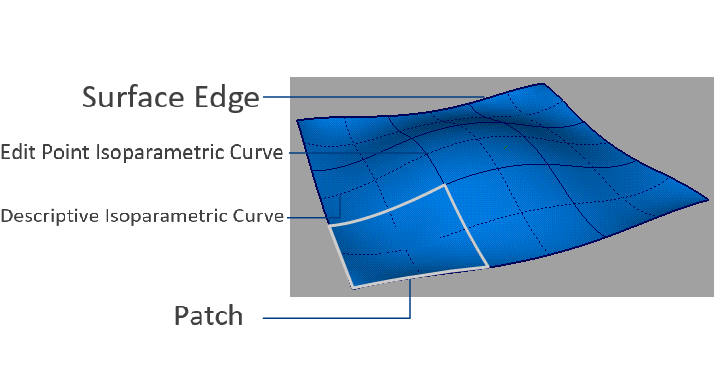
std::shared_ptr< AMCAX::Geom3Curve >uiso = CylindricalSurface4.UIso(2.);
std::shared_ptr< AMCAX::Geom3Curve >viso = CylindricalSurface4.VIso(2.);

In the above example, the UIso is a line parallel to the Z-axis located on the side of the cylinder, and the VIso is a circle with radius r = 2.0 located at height v = 2.0.

Subclasses

Geom3Plane

Geom3Plane is a plane in 3D space with an infinite parameter domain. The plane can be created based on AMCAX::Frame3, with the XOY plane as the surface and the OZ axis as the normal. The u direction corresponds to the OX direction, and the v direction corresponds to the OY direction. The 3D space point at (u, v) = (0, 0) is the origin of the Frame3 coordinate system.
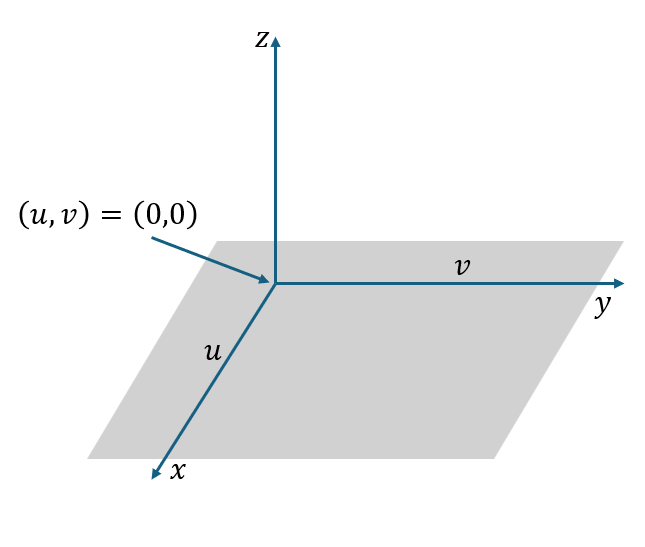
AMCAX::Geom3Plane plane(frame);
AMCAX::OCCTIO::OCCTTool::Write(AMCAX::MakeFace(plane.GetPlane(), 0., 2., 0., 2.), "plane.brep");
Class of 3D plane.
Definition Geom3Plane.hpp:14
Class of making a face.
Definition MakeFace.hpp:24

Geom3SphericalSurface

Geom3SphericalSurface is a sphere in 3D space with a parameter domain of [0, 2π) x [-π/2, π/2]. The parameters correspond to spherical coordinates. The sphere can be created using AMCAX::Frame3 and a radius. The origin of Frame3 is the center of the sphere. The circle in the XOY plane corresponds to an iso-parameteric curve with v = 0, while the semicircle in the XOZ plane corresponds to the iso-parameteric curve with u = 0. The positive u direction corresponds to a rotation of the OX axis towards the OY axis, and the positive v direction corresponds to a rotation from -OZ to OZ.
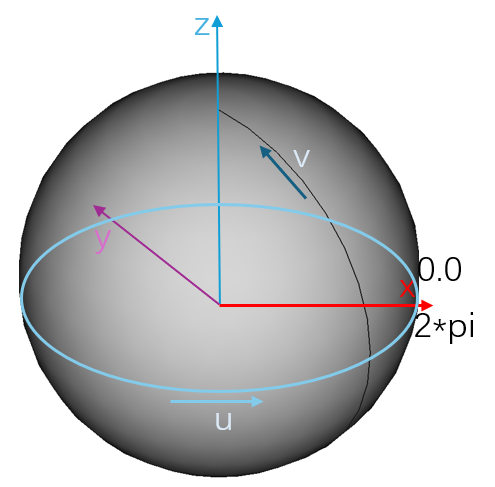
AMCAX::OCCTIO::OCCTTool::Write(AMCAX::MakeFace(SphericalSurface.GetSphere(), 0., 1., 0., 1.), "SphericalSurface.brep");
Class of 3D spherical surface.
Definition Geom3SphericalSurface.hpp:14

Geom3CylindricalSurface

Geom3CylindricalSurface is a cylindrical surface (infinite length) in 3D space with a parameter domain of [0, 2π) x [-∞, ∞]. The parameters correspond to cylindrical coordinates. The cylinder surface can be created using AMCAX::Frame3 and a radius. The circle in the XOY plane corresponds to an iso-parameteric curve with v = 0. The positive u direction corresponds to a rotation from the OX axis towards the OY axis, while the v direction corresponds to the positive z direction. The change in v corresponds to the change in arc length.
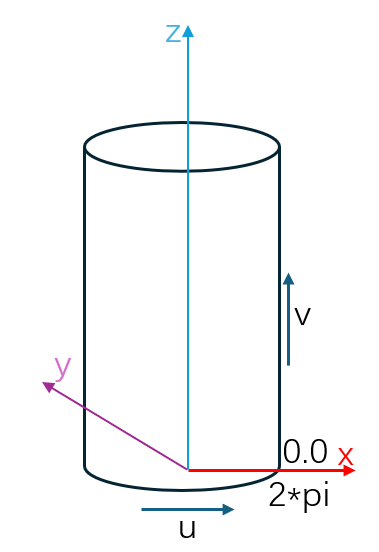
AMCAX::Geom3CylindricalSurface CylindricalSurface(AMCAX::Frame3(), 2.0);
AMCAX::OCCTIO::OCCTTool::Write(AMCAX::MakeFace(CylindricalSurface.GetCylinder(), 0., 2., 0., 2.), "CylindricalSurface.brep");

Geom3ConicalSurface

Geom3ConicalSurface is a conical surface (infinite length) in 3D space with a parameter domain of [0, 2π) x [-∞, ∞]. The conical surface can be created using Frame3, the radius of the circle in the XOY plane, and the half-angle. The circle in the XOY plane corresponds to an iso-parameteric curve with v = 0. The positive u direction corresponds to a rotation from the OX axis towards the OY axis, while the positive v direction corresponds to an inclined line, forming an acute angle with the z direction.
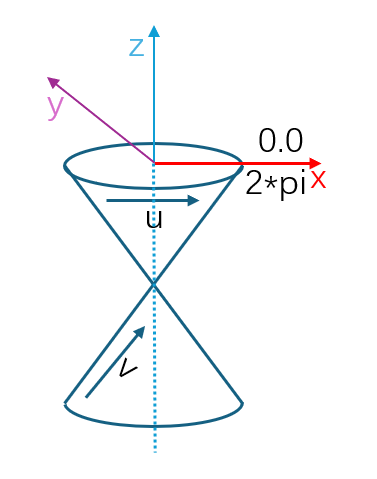
AMCAX::Geom3ConicalSurface ConicalSurface(AMCAX::Frame3(), 2.0, 45.0 * AMCAX::Constants::pi / 180.0);
AMCAX::OCCTIO::OCCTTool::Write(AMCAX::MakeFace(ConicalSurface.GetCone(), 0., 2., 0., 2.), "ConicalSurface.brep");
Class of 3D conical surface.
Definition Geom3ConicalSurface.hpp:14

Geom3ToroidalSurface

Geom3ToroidalSurface is a toroidal surface (doughnut shape) in 3D space with a parameter domain of [0, 2π) x [0, 2π]. The toroidal surface can be created using Frame3, the large radius, and the small radius. The standard circle in the XOY plane corresponds to an iso-parameteric curve with v = 0, while the standard circle in the XOZ plane corresponds to an iso-parameteric curve with u = 0.
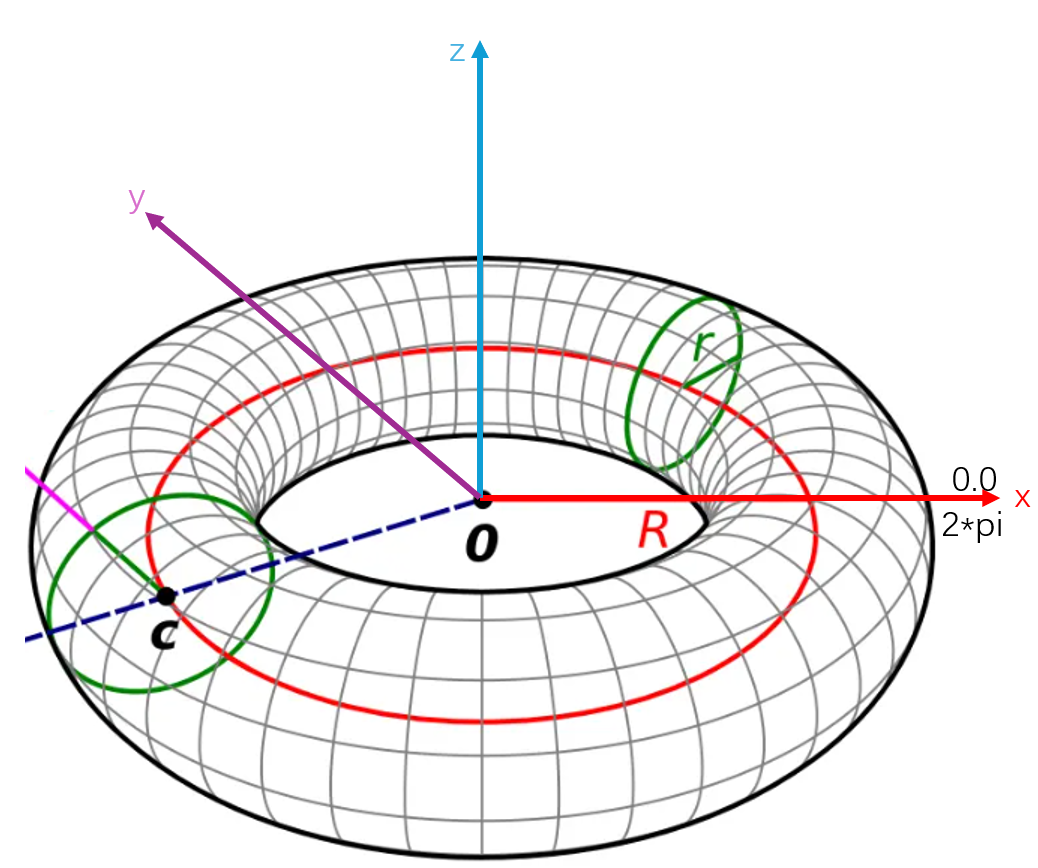
AMCAX::Geom3ToroidalSurface ToroidalSurface(AMCAX::Frame3(), 2.0, 1.0);
AMCAX::OCCTIO::OCCTTool::Write(AMCAX::MakeFace(ToroidalSurface.GetTorus(), 0., 2., 0., 2.), "ToroidalSurface.brep");
Class of 3D toroidal surface.
Definition Geom3ToroidalSurface.hpp:14

Geom3BezierSurface

Geom3BezierSurface is a Bezier surface in 3D space with a parameter domain of [0, 1] x [0, 1]. The Bezier surface can be created using control points and optional weights. When creating it, make sure the number of weights matches the number of control points. If all weights are equal (e.g., all equal to 1), the rational Bezier surface degenerates into a standard Bezier surface.

poles(0, 0).SetCoord(0.0, 0.0, 0.0);
poles(0, 1).SetCoord(1.0, 0.0, 2.0);
poles(0, 2).SetCoord(2.0, 0.0, 1.0);
poles(0, 3).SetCoord(3.0, 0.0, 0.0);
poles(1, 0).SetCoord(0.0, 1.0, 1.0);
poles(1, 1).SetCoord(1.0, 1.0, 3.0);
poles(1, 2).SetCoord(2.0, 1.0, 2.0);
poles(1, 3).SetCoord(3.0, 1.0, 1.0);
poles(2, 0).SetCoord(0.0, 2.0, 1.0);
poles(2, 1).SetCoord(1.0, 2.0, 2.0);
poles(2, 2).SetCoord(2.0, 2.0, 3.0);
poles(2, 3).SetCoord(3.0, 2.0, 1.0);
poles(3, 0).SetCoord(0.0, 3.0, 0.0);
poles(3, 1).SetCoord(1.0, 3.0, 1.0);
poles(3, 2).SetCoord(2.0, 3.0, 1.0);
poles(3, 3).SetCoord(3.0, 3.0, 0.0);
AMCAX::Array2<double> weights(4, 4);
for (int i = 0; i < 4; ++i) {
for (int j = 0; j < 4; ++j) {
weights(i, j) = 1.0;
}
}
std::shared_ptr<AMCAX::Geom3BezierSurface> BezierSurface = std::make_shared<AMCAX::Geom3BezierSurface>(poles, weights);
Template class of two dimensional array.
Definition Array2.hpp:17
static constexpr double Confusion() noexcept
Get the confusion tolerance.
Definition Precision.hpp:122

Geom3BSplineSurface

Geom3BSplineSurface is a B-Spline surface in 3D space. The B-Spline surface can be created based on control points, knot vectors, knot multiplicities, and curve degrees. The following conditions must be met when creating it: The length of UKnots = the length of UMultiplicities; The length of VKnots = the length of VMultiplicities;sum(UMultiplicities) = Poles.Rows() + UDegree + 1;sum(VMultiplicities) = Poles.Cols() + VDegree + 1;The knot vectors must be monotonically increasing, and the multiplicity of each knot cannot exceed the degree of the curve.
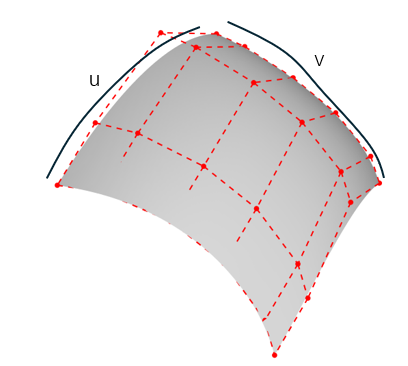
poles2(0, 0).SetCoord(0.0, 0.0, 0.0);
poles2(0, 1).SetCoord(0.666667, 1., 0.333333);
poles2(0, 2).SetCoord(-0.666667, 0., -0.333333);
poles2(0, 3).SetCoord(0.0, 1., 0.0);
poles2(1, 0).SetCoord(0.666667, 1., 0.333333);
poles2(1, 1).SetCoord(1.44444, 2.22222, 0.777778);
poles2(1, 2).SetCoord(-1.22222, 1.22222, 0.111111);
poles2(1, 3).SetCoord(-0.666667, 2., 0.333333);
poles2(2, 0).SetCoord(0.333333, 1., -0.333333);
poles2(2, 1).SetCoord(1.11111, 0.222222, 0.111111);
poles2(2, 2).SetCoord(2.44444, 3.22222, 0.777778);
poles2(2, 3).SetCoord(1.66667, 2., 0.333333);
poles2(3, 0).SetCoord(1., 0.0, 0.0);
poles2(3, 1).SetCoord(1.66667, -1., 0.333333);
poles2(3, 2).SetCoord(1.66667, 2., 0.333333);
poles2(3, 3).SetCoord(1., 1., 0.);
std::vector<double> uknots = { 0.0, 1.0 };
std::vector<int> umults = { 4, 4 };
std::vector<double> vknots = { 0.0, 1.0 };
std::vector<int> vmults = { 4, 4 };
std::shared_ptr<AMCAX::Geom3BSplineSurface> BSplineSurface = std::make_shared<AMCAX::Geom3BSplineSurface>(poles2, uknots, vknots, umults, vmults, 3, 3);

Geom3SurfaceOfExtrusion

Geom3SurfaceOfExtrusion is an extrusion surface (stretch surface) in 3D space (infinite), which can be created based on a base curve (Geom3Curve) and extrusion direction. The u-direction is the parameter direction of the base curve, and the v-direction is the extrusion reverse. The isoparametric line v=0 corresponds to the base curve, and any u-isoparametric line is a straight line. The u parameter domain corresponds to the base curve's parameter domain, while the v parameter domain is infinite.
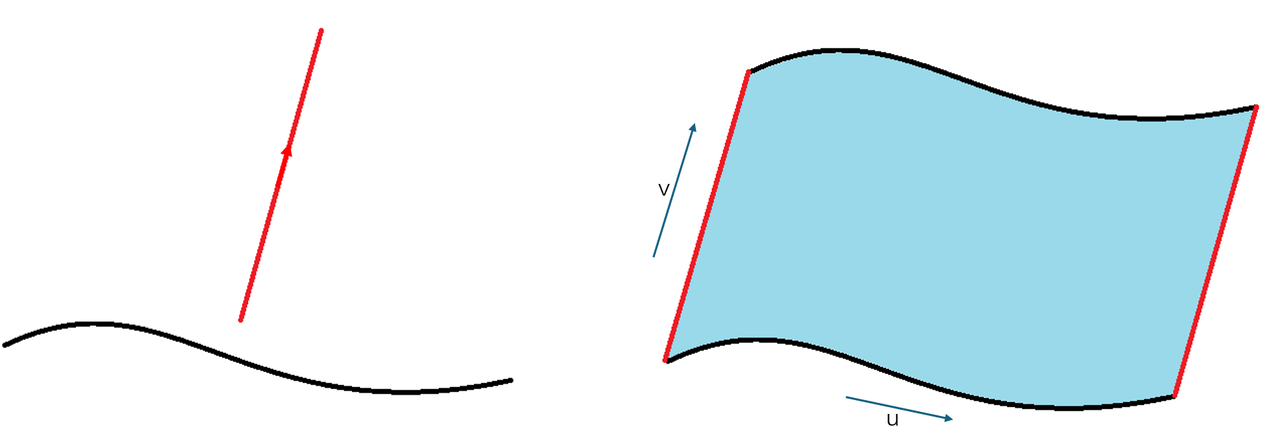
std::shared_ptr<AMCAX::Geom3Curve> curve = std::make_shared<AMCAX::Geom3Circle>(AMCAX::Frame3(), 1.0);
std::shared_ptr<AMCAX::Geom3SurfaceOfExtrusion> SurfaceOfExtrusion = std::make_shared<AMCAX::Geom3SurfaceOfExtrusion>(curve, AMCAX::Direction3(0.0, 0.0, 1.0));
std::shared_ptr<AMCAX::Geom3TrimmedSurface> trimex = std::make_shared<AMCAX::Geom3TrimmedSurface>(SurfaceOfExtrusion, 0., 2*AMCAX::Constants::pi, 0., 5.);

Geom3SurfaceOfRevolution

Geom3SurfaceOfRevolution is a surface of revolution in 3D space. It can be created based on a base curve (Geom3Curve) and an axis of rotation. The u parameter domain is [0, 2π), and the v parameter domain is the domain of the base curve. Each v-isoparametric line is a circle with its center on the rotation axis, and each u-isoparametric line can be generated by rotating the base curve around the axis.
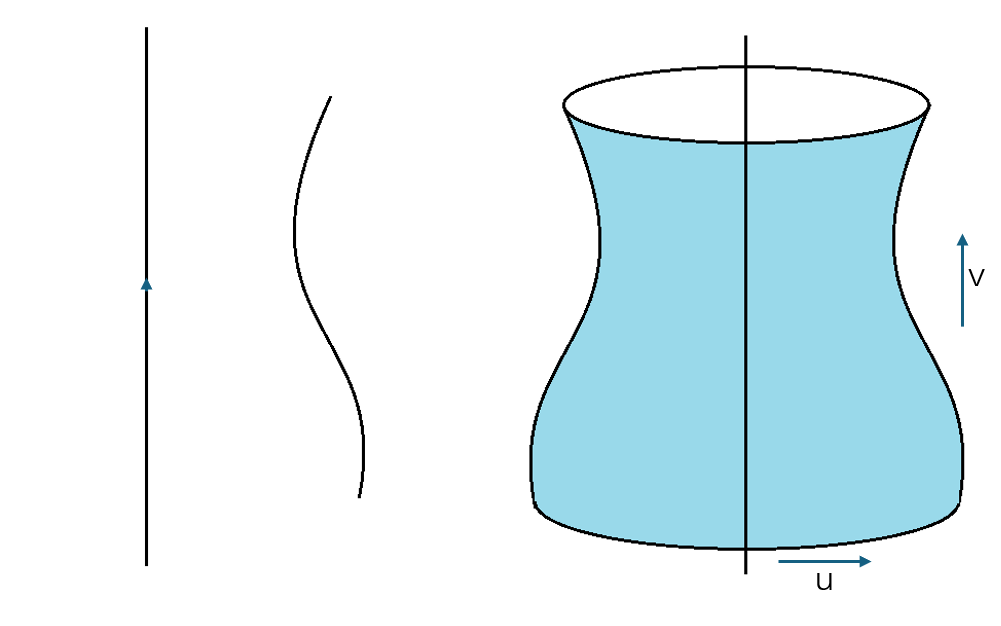
AMCAX::Direction3 dir(1.0, 0.0, 0.0);
std::shared_ptr<AMCAX::Geom3Curve> curve2 = std::make_shared<AMCAX::Geom3Circle>(AMCAX::Frame3(), 1.0);
std::shared_ptr<AMCAX::Geom3TrimmedCurve> trimCurve = std::make_shared<AMCAX::Geom3TrimmedCurve>(curve2, 0.0, AMCAX::Constants::pi/4);
AMCAX::Axis3 axis(p, dir);
std::shared_ptr<AMCAX::Geom3SurfaceOfRevolution> SurfaceOfRevolution = std::make_shared<AMCAX::Geom3SurfaceOfRevolution>(trimCurve, axis);
AMCAX::OCCTIO::OCCTTool::Write(AMCAX::MakeFace(SurfaceOfRevolution, AMCAX::Precision::Confusion()), "SurfaceOfRevolution.brep");
AxisT< double, 3 > Axis3
3D axis
Definition AxisT.hpp:423

Geom3TrimmedSurface

Geom3TrimmedSurface is a trimmed surface in 3D space, created from an original surface with trimming parameters. You can trim in the u-direction, v-direction, or both u and v directions. To access the original surface, you can use AMCAX::Geom3TrimmedSurface::BasisSurface.

std::shared_ptr<AMCAX::Geom3CylindricalSurface> CylindricalSurface2= std::make_shared< AMCAX::Geom3CylindricalSurface>(AMCAX::Frame3(), 3.0);
std::shared_ptr<AMCAX::Geom3TrimmedSurface> TrimmedSurface = std::make_shared<AMCAX::Geom3TrimmedSurface>(CylindricalSurface2, 0., 5., false);
//Get the basissurface
auto basis = TrimmedSurface->BasisSurface();

Geom3OffsetSurface

Geom3OffsetSurface is an offset surface in 3D space, which moves every point of the original surface along its normal direction by a certain distance. To access the original surface, you can use AMCAX::Geom3OffsetSurface::BasisSurface.

std::shared_ptr<AMCAX::Geom3CylindricalSurface> CylindricalSurface3 = std::make_shared< AMCAX::Geom3CylindricalSurface>(AMCAX::Frame3(), 2.0);
std::shared_ptr<AMCAX::Geom3TrimmedSurface> TrimmedSurface2 = std::make_shared<AMCAX::Geom3TrimmedSurface>(CylindricalSurface3, 0., 5., false);
AMCAX::OCCTIO::OCCTTool::Write(AMCAX::MakeFace(TrimmedSurface2, AMCAX::Precision::Confusion()), "TrimmedSurface2.brep");
//Get the 3D offset surface
std::shared_ptr<AMCAX::Geom3OffsetSurface> offsetsurface1 = std::make_shared<AMCAX::Geom3OffsetSurface>(TrimmedSurface2, 2.);
//Get the basissurface
auto basis2 = offsetsurface1->BasisSurface();

To obtain the equivalent surface after offsetting, such as a sphere or cylinder, you can use AMCAX::Geom3OffsetSurface::Surface.

AMCAX::Geom3OffsetSurface offs(TrimmedSurface2, 2.);
std::shared_ptr<AMCAX::Geom3Surface> offsetsurface2 = offs.Surface();
Class of 3D offset surface.
Definition Geom3OffsetSurface.hpp:20

In fact, all the offset surfaces (plane, sphere, cylinder, cone, torus, extrusion, revolution, Bezier, BSpline) mentioned above can be represented by the original surface type. However, only equivalent surfaces of trimmed or non-trimmed planes, cylinders, cones, spheres, and tori are implemented, while the others will return a null pointer.